

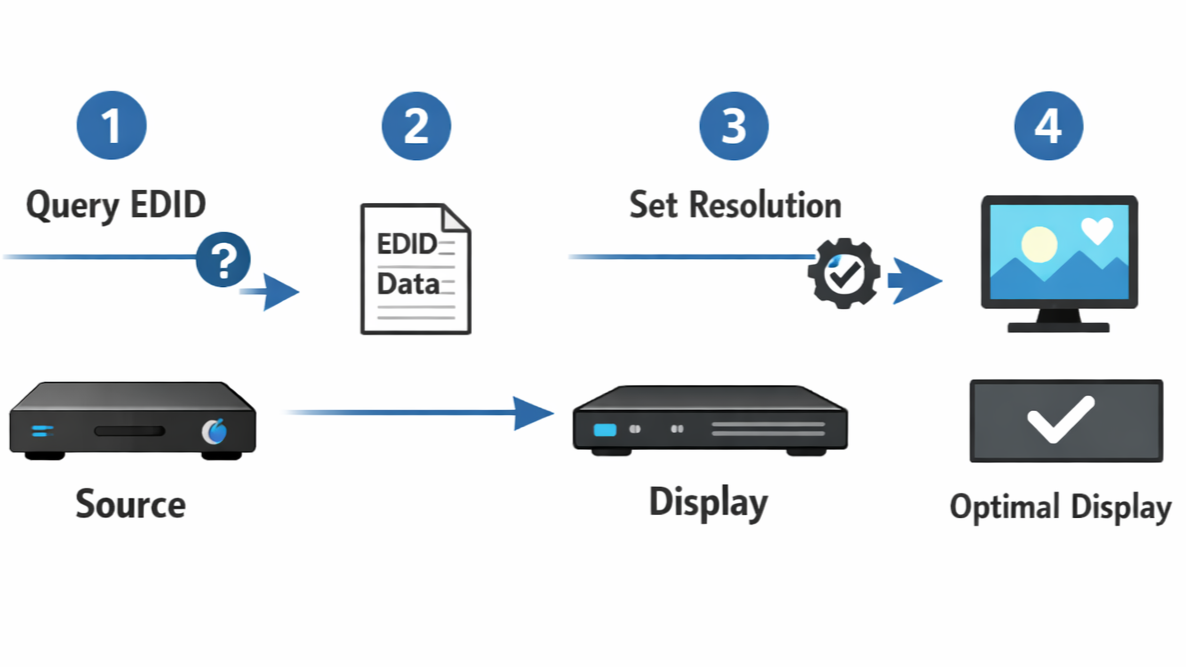
Sometimes, visual systems are prone to display issues even before a signal is received. In this case, the problem arises from a process known as EDID handshake... a silent dialogue between the source device and visual system. If negotiation between these two components fail, then the video qualities would vanish before the signal is transmitted.
The dialogue between the source device and the display is a real-time negotiation that depends on certain factors. Since the negotiation is not dependent on static data, it can easily be interrupted or corrupted during connection. To help users better understand, this article breaks down the process of EDID handshake in real-world conditions including timing sequence, and negotiation process.
What “Handshake” Means?
A handshake is the first communication phase that must successfully occur between the source device and visual system before signals can be transmitted. This process occurs automatically after a physical connection is detected. During connection, the source device is tasked with getting necessary information regarding the capacity of the display.
At this point, the visual system responds to the source device by sending its EDID information… a set of data displaying the capabilities of the display. This data includes the supported resolutions, refresh rates, audio formats, and color depth formats.
However, this process is an active exchange of data that must be successful before the signal is transmitted. Perhaps the connection stalls at some point, the source device will have no reliable basis for selecting adequate signal. Hence, they transmit no signal or video output with limited resolution or incorrect refresh rates.

Image credit: Extron
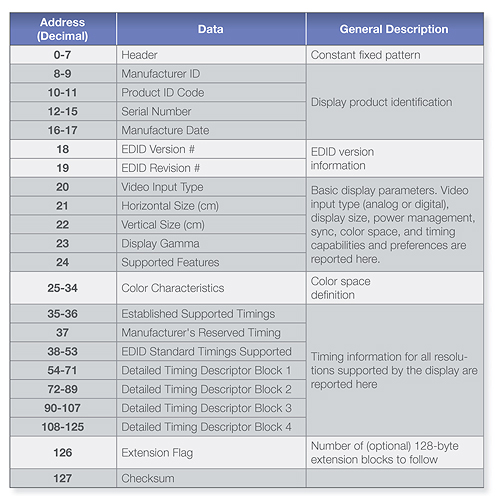
Handshake Process And Data Transmission
Before video signaling occurs, EDID exchange takes predominance over any other process. It is the phase where physical connection between the primary components is detected. Afterwards, the source device is tasked with analyzing the EDID data from the visual system, which is then used to determine the resolution options, refresh rates and other important video display features.
However, most users tend to mistake the handshake process with signal output. On one hand, the handshake phase is all about capability discovery, where the source determines what type of signal can be sent. On the other hand, signal output is the continuous process of streaming pixels after the handshake process. This process will be compromised if the EDID data is not successfully read by the source device.
What Components Are Involved in the Handshake?
EDID data transfer is not as easy as it seems. The exchange involves a series of coordinated communication between the source hardware, OS, and the monitor… each playing different roles in determining the output signal.
In the source device, the GPU and display engine are the first to kickstart the process. After physical connection, the GPU requests for the EDID to determine the resolution, refresh rates and other HDR qualities that are supported by the visual system. Beyond this phase, the GPU also examines the capabilities of the display against its own boundaries and bandwidth limit. Any display metric that exceeds the GPU’s limit is automatically reverted and scaled down to a lower level before the video signal is transmitted.
However, the visual system is solely responsible for reporting its specifications correctly. While EDID is stored, the data is usually reported in different ways based on the power state. In other words, they are not always presented as stable information since its delivery is dependent on perfect timing.
At this point, the OS runs the final phase of this process. After the GPU determines the specifications of the visual system, the OS concludes on the display mode to release as output for the user. In some cases, they tend to manage refresh rate and filter technically supported resolutions.
The EDID Handshake Sequence Step by Step
As complex as it sounds, the EDID handshake follows a technical sequence before signal output. These steps are usually followed within seconds of physical connection between the two major components. After a successful connection, the EDID sequence is almost instantaneous.
Hot Plug Events
Before the initiation of the EDID handshake, signal output is solely triggered by a physical connection at the electrical level. During connection, a pin in the connector is responsible for the transmission of data from the visual system to the source device. In display interface connection, this mechanism is referred to as Hot Plug Detect (HPD).
Whenever the visual system is in the HPD mode, it sends information to the source device that it is ready to negotiate. This is the process that initiates EDID handshake. If HPD behavior is unstable due to certain issues related to cable quality, the source device has no choice but to restart the whole handshaking procedure.
Capability Parsing
After the EDID data is successfully read by the source device, they are moved into a series of phases where decisions on the signal output are made. This is the phase where the source device identifies every video output feature the display supports.
Meanwhile, the source device does not conclude its signal output based on the direct metrics provided. Instead, it analyzes what is sustainable over the current link based on its bandwidth limitations. This is the point where certain trade-offs are made to fit within the limitation. Eventually, it selects its resolution, refresh rate, and color format.
This also explains why the “best” mode is usually not selected automatically. In default mode, the operating system generally prefers compatibility over display support.
How EDID Handshake Is Different Based On Connection Type?
While the EDID handshake process is known to follow the same sequence, they tend to act differently depending on the connection type. Some connection types force multiple layers of interpretation between the major components involved in EDID handshake.
Direct DisplayPort Connections
One of the most straightforward means to ensure a smooth handshake process is through a direct DisplayPort connection. Generally, DisplayPort provides a dedicated AUX channel for EDID handshake, separating it from other high speed lanes. This separation helps the components to negotiate easily and prevent the EDID handshake from interfering with the transmission of image frames.
On a technical level, this type of connection reduces the risk of corrupted data. However, it doesn’t make them immune to other functionality issues that can force renegotiation.
USB-C and DisplayPort Alt Mode
The use of connectors like USB-C to transmit video data introduces a level of complexity in EDID handshake. At this point, it no longer follows the straightforward sequence of GPU and visual system connection. Instead, it introduces new controllers that help to facilitate the EDID handshake process.
Before the transmission of EDID data, the USB-C has to negotiate its role as the system agrees to function in DisplayPort Alt Mode. After Alt Mode is successfully negotiated, EDID handshake begins. Meanwhile, EDID failures are more common in this system due to the presence of added controllers.
Docks And Adapters
Just like USB-C and DisplayPort Alt Mode, docks and signal converters add more complexity to the EDID handshake process. Similarly, these components are positioned between the source device and visual system, increasing the negotiation process.
Within this complexity, a key factor is whether the additional device handles EDID through forwarding or emulation. In the case of EDID forwarding, the signal converter transmits the EDID data to the source device. On the other hand, EDID emulation happens when the dock or adapter actively transmits its EDID data, rather than presenting the visual system’s data. This is the main reason for incorrect capability reporting.
Why EDID Handshake Fails in The Real-World?
There are moments where EDID negotiation fails in certain setups despite full hardware compatibility across the handshake sequence. This type of situation is usually beyond the control of users.

Image credit: freepik
Timing Mismatch
One of the most common issues in EDID handshake is timing mismatch between the two major components involved. In situations like this, the visual system may not be fully initialized when the source device starts requesting for EDID data.
Altered EDID Data
Sometimes, source devices fall victim to income EDID data due to initialization delays and corrupt signal converters. This results in misinterpretation of HDR qualities, leading to poor overall display. In cases like this, the source device may revert to default mode or use corrupted data from the adapter or dock.
The Role of OS and Drivers in EDID Handshake
While the source device and display remain the two major components in EDID handshake, the OS and other drivers are largely involved in this process. Here are the major functions of these elements.
OS-Level Display Management
Immediately after EDID handshake, the next line of action falls to the OS. This is where processed information is overrode, prioritizing sustainability over capability. This element helps to maintain the bandwidth limit by selectively enabling the HDR features reported by the EDID handshake.
GPU Driver Behavior
Even after the involvement of the OS, the GPU driver still plays a massive role in the presentation of display modes. The GPU driver is responsible for implementing mode filtering for the sake of compatibility.
Signs of EDID Handshake Complication
When the EDID handshake process fails, the resulting video output is always noticeable immediately. Here are some of the most common visible signs;
- Resolution locked at 60Hz
- HDR options missing
- Incorrect aspect ratio or scaling
- Display detected but no image shown.
Differences In Hardware Behavior
The EDID handshake procedure is generally influenced by a lot of factors at the technical level. This is why handshake results will sometimes vary even when using the same type of source device, visual system and component in between. Here are some factors that greatly influence EDID handshake.
Firmware Dependencies
One big factor that plays a role in timing of EDID handshake is the BIOS and firmware of the two main components involved. Any slight adjustment in the initialization process can lead to alteration in how EDID data is presented. This accounts for the inconsistencies in results across components of similar models.
Multi-Display and Daisy-Chain Scenarios
Just like signal converters, multiple display setups increases the complexity of EDID handshake. In this case, the source device must have access to the EDID data from the connected visual systems through intermediary devices.
However, this process is very prone to corrupt and overlapping data during the negotiation process. Moreover, the intermediary connection may sometimes tamper with the original EDID data due to certain limitations.

How to Improve EDID Handshake Reliability?
Generally, an EDID handshake is a complex and unpredictable process. Nevertheless, there are practical procedures that can be taken to improve the chances of a successful handshake. Since most of these problems arise from uncontrollable situations, it is important to resolve these display issues.
Connection and Power Best Practices
One of the most successful ways to facilitate EDID handshake is by initializing display. Users should connect the powered-on source device to the visual system in a standby mode, allowing the negotiation process to begin as the monitor is turned on.
It is also important to avoid disconnecting cables while the monitor is initializing. Through power sequencing, users can carefully manage how visual systems are adequately connected.
Reducing Handshake Complexity
The best solution to handshake complications is to simplify the negotiation sequence. Cut out unnecessary signal converters that sometimes mess with the transmission chain. Any intermediary device (e.g docks, adapters, and hubs) should never support EDID emulation irrespective of the bandwidth limit.
Why Understanding EDID Handshake Matters?
Many display problems that users encounter are not caused by faulty panels or incompatible monitors, but by failures in the EDID handshake itself. Misinterpreted EDID can make perfectly capable monitors appear “incompatible,” with missing resolutions, disabled HDR, or incorrect refresh rates.
Conclusion
The EDID handshake is fundamentally a negotiation that happens before a single pixel appears. It establishes the boundaries of communication, defining what the source and display agree is technically possible. Ultimately, the system relies entirely on this handshake to decide what it can safely send, which is why display behavior often seems unpredictable when issues arise.
Share:
Why 4K 144Hz Sometimes Requires DSC or Chroma Subsampling?
How KVM, Docking Stations, and Adapters Affect EDID Data?