

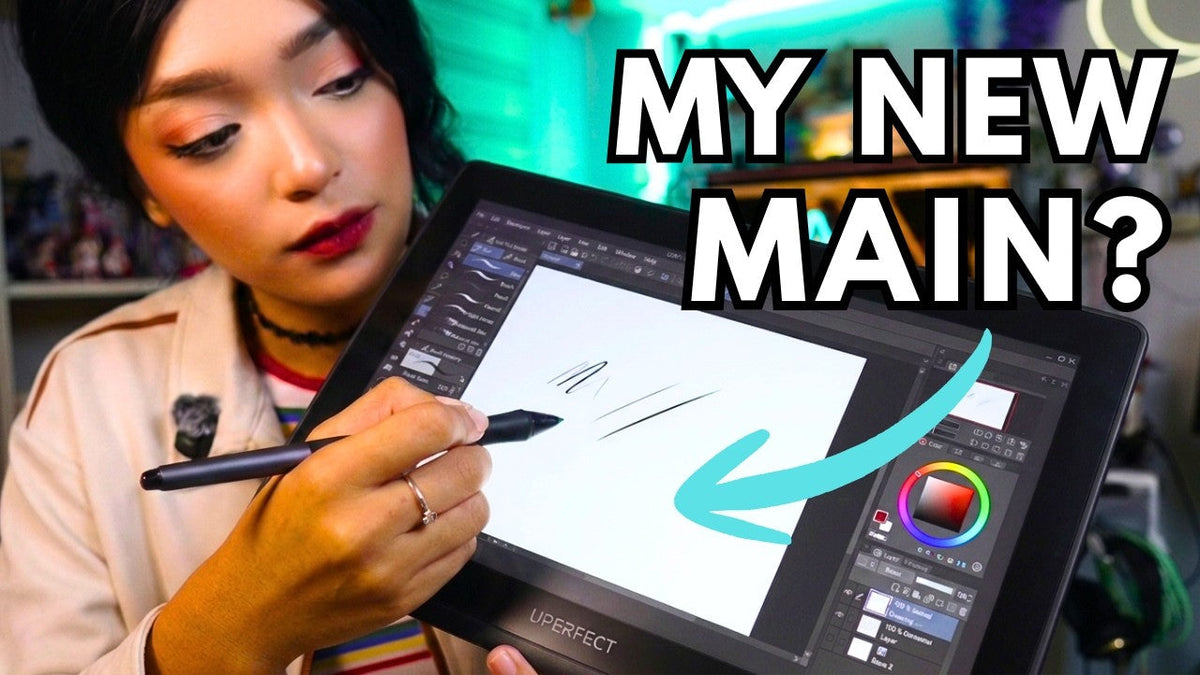
Hey guys, it's Sam. Welcome back to the channel, and I'm super excited because today we're doing something a little different. I am going to be reviewing a pin display tablet from UPERFECT. It is the UPERFECT UD14BQ pin display monitor tablet.
So, if you've been on the hunt for a new drawing tablet, or if you just would like to know what I think of my thoughts about different types of drawing tablets, here's one that you're going to want to watch. What I'm gonna do in this video is go through the general of this pin display tablet. I'm going to give you my first impressions of the tablet upon first use, tell you more about my overall thoughts after using this tablet for an extended period of time.
So enough of me rambling. Let me tell you what this thing is all about.
General Overview

Screen Resolution and Display Quality
So, let's start with the screen. It's 2560 by 1600, which is about 215 pixels per inch. And what that means for us is sharp lines and smooth curves and plenty of detail when you zoom in.
UPERFECT really emphasizes the color on this one, and I have to say, which you'll see in my first impressions, the color is a huge draw on this pen display tablet. It's a cute LED panel, and it has a wide range of colors to work with, so everything that you draw or paint or illustrate is going to look very true to exactly what you intended on your artwork. You could also expect that detail and highlights and all sorts of coloring will really stand out.
Fully Laminated Screen and Anti-Glare Finish
Another big draw for this tablet is that the screen. It is fully laminated, so there's no air gap between the glass and the display. You're gonna feel like you're drawing on paper, and I noticed, I don't know if this is something that's actually true to what they intended, but there's a really good anti-glare on this tablet too.
And as someone that has a million lights on her desk, I found that to be really important and great for me.
Stylus Design and Portability
It has a rocker on the stylus, and this thing is absolutely built to be super-duper portable. It's really thin. And lightweight, and you can slide it in a bag extremely easily.
Connectivity and Device Compatibility
Now, remember, I said this is a pin display monitor. It is not an all in one, so it doesn't come preloaded with Android OS or anything of the sort. It comes with several USB cables and one of those like three-pronged types of cables that has HDMI and everything on it.
That's the general overview of this pin display tablet. So, what we're gonna do now is go through my first impressions when I first whipped it out of the box and gave it a test run. Let's see what I thought.
First Impressions of the UPERFECT UD14BQ

Initial Setup and Drawing Test
I thought about it when I first brought it out of the box. So we're gonna do a first impression of the UPERFECT UD14BQ. And so, I've got it all set up here.
I'm using Clip Studio, and I'm just gonna do a couple of stroke tests, do some writing, and just see how the basic mechanics of the tablet work.
Parallax and Cursor Accuracy
So, the very first thing that I noticed is that the parallax is basically just the same as my Wahasini. So basically, the little point of the cursor that you see. And the tip of your styles is exactly lined up and for me this is a big deal.
I had another pen tablet in the past and it was just not as good with that and that can really affect how you draw.
Screen Clarity and Vibrant Colors
So, I'm gonna go ahead and just grab a bigger, there we go. So, let's just do some scribble tests here. So, I, upon first impressions, I'm absolutely loving the clarity of the screen.
The colors are very vibrant. They show up very vibrantly. They look beautiful as you can see here. I'm still getting used to clicking the buttons properly, but the color looks really, really, really nice.
So, if you're an illustrator, if you're somebody that uses color a lot on your preferred, drawing software, I think that you'll enjoy just the clarity.
Testing Different Colors
Let's try another very vibrant color here. You can see that the colors show up really nicely. Hopefully you can see that, from the angle that the tablet is here.
Drawing Responsiveness and Stroke Accuracy
 And I must say, like doing strokes, it registers right as I'm, you know, doing the stroke as I'm drawing the line. It's like it feels very accurate and extremely responsive to the line that I'm drawing, which is like super important.
I'm a Mangaa, so I do a lot of hatching. You know, a lot of, cross hatching and whatnot. So, for me it's very important that the lines register as I, you know, draw them.
That's a huge thing for me. So, I'm really loving the responsiveness so far of this tablet.
Circle Test and Stylus Grip
Doing a circle test, you can see my circles are not the best, but yeah, overall, I'd say really responsive, really nice feel, the grip of the stylus. So let me show you my scentique stylist.
So, this stylus, from Welcome Centique is actually extremely uncomfortable to the hand. There's, you could buy a grip extension for this thing, but, it's a lot of money on top of the device itself.
It's very uncomfortable. I think they tried to design it. More like a pencil, and for me it's not comfortable at all.
Comparing the UPERFECT Stylus with Other Styluses
However, you perfect stylus here already has a grip, so it feels really soft in your hand and it also feels nice and the sizing of it feels quite nice as well, which to me just feels more ergonomic and because I draw for very long extended periods of time at a time, it's really important for me to have a comfortable stylus, and this stylus is great. I absolutely love this stylus.
Testing the Stylus with Manga Artwork
If you're a little bit confused about why Frieza is holding a guitar, don't worry about it. Just pay attention to how the tablet itself feels to use, or at least how it, how it looks. To use and I'm gonna go ahead and use one of the pins that I use all the time when I'm lining.
Already, as I said, I feel a really good sense of pressure. Like it really applies the pressure that I'm. Using when I'm drawing, which again, that accuracy, that pressure accuracy is very important.
If I gently draw a line, it gently shows that line. If I, you know, do a nice solid stroke downwards, it registers that as well. So, it's very, very, very true to the motion that you're using with your hand, which can sometimes be a little unforgiving, but in the case of this tablet, I think it works really well.
Testing Hatching and Cross-Hatching
Let's try it out on an actual manga page just so we can Get a better sense for the hatching. So, this is a page from the remaster of chapter one of Yield Tree House, which is my manga, link in the description if you want to check it out.
So, the reason why I'm testing with hatching is because that's a good way to see how quick strokes are registered on this tablet. We're just gonna do some quick hatching strokes.
Yeah. And so, I'm really feeling and getting a good sense of like this tablet registering every stroke. Sometimes you might find when you use a drawing tablet. That it doesn't register every single stroke that you use, but this one, it's, it's very accurate, which I find is extremely important for drawing manga.
Overall Experience After Extended Use

Time Spent Using the Tablet
OK, so that was my first impressions of this drawing tablet, and as I said before, I was blown away by the color clarity on this device. It's something that is very noticeable to me, the, the crisp quality. And the way that colors appear.
Now, I used the UPERFECT UD14BQ for about 5 or so hours, which is a little bit under my normal drawing time, which is typically 8 hours, but it came pretty close, and I jotted down a couple of questions that I thought would be helpful to give my overall impressions of the device after using it for what would be somewhat of a normal workday for me.
The, I'm gonna be reading from my phone, hopefully you guys don't mind.
Hand and Wrist Comfort During Long Drawing Sessions
Did my hands or wrists get tired? So, the answer to that is no. My hands or wrists did not get tired at all, and I basically attribute this mostly to, two things.
One, the way that the kick stand is on the tablet is actually for me, the perfect height where I'm not, it's not completely flat down. Some people like to draw like that, but it's not completely flat down where I'm, I find my neck, you know.
Leaning forwards, and it's not too high up where my, my wrist and my arm is kind of like doing one of these here. So, it was a perfect angle for me to be able to comfortably draw for an extended period of time.
You have to keep in mind because there is that kickstand, you don't have the ability to kind of like angle it to the exact degree that you want, like you might in some other tablets. So, I did think that the angle that the kickstand was in was perfect for me.
Comfortable Stylus Design
The second thing that I attribute that to is actually the stylist. I'm gonna turn around and show you guys once more. Now, I've been using another tablet, one of the tablets that's quite big on the market, and I must say the pen design of that particular tablet is not great.
I think they modeled it after a pencil, and it's really thin and extremely uncomfortable, and if you want to buy a grip for it, you're gonna be looking at, at least $100.
Now, the thing I love about UPERFECT’s stylist is that as you can see, there's already a grip, and I think I mentioned this in my first impressions, but there's already a grip here, which makes it feel really good in the hands, especially when you're drawing for an extended period of time. So, for me, my wrist and hand felt perfect.
Eye Comfort and Screen Clarity
Did your eyes feel fine using this device? This is a big one for you folks like myself that have any sort of eye conditions. I have a plethora of eye problems, and when you're staring at a drawing tablet for a long period of time, it's basically.
Guarantee that you're gonna run into some eye problems whether that's with like the blue light and things like that and for me, the clarity of the screen and the crispness of it and the fact that you know it's a pin display, so whatever settings that I have set on my computer are already on this pin display tablet like I use night mode as you can see the screen is completely orange behind me, so I had no issues with my vision, while using the device for an extended period of time.
Screen Temperature During Use
Did the screen get warm? I did not experience the UPERFECT UD14BQ getting warm perceivably to me in a way that made me alarmed, and I think this is another draw of this tablet and really pin display tablets in general, with all in one tablets, you have software that is baked into the device, so you have to update firmware, like, for example, I have another tablet that runs on Android OS and it's like a little computer, you know, that's gonna get a lot more hot than it.
Display, which is literally just a display and it goes into your computer. So, the temperature for me on this device did not get warm to the point of me being alarmed at all. It was barely perceivable if there was any warmth at all.
It was barely perceivable for me for the time that I was drawing.
Drawing Feel and Matte Screen Finish

How did drawing feel? OK, so this is the most important thing. How did drawing feel on this thing? Now, the screen has a little bit of a matte finish, which I love because if you've ever used a tablet that has like a glossier.
Finish Drawing doesn't feel, I, I want to use the word realistic, at least to me. It doesn't have that sort of friction that you might find when you're drawing on a piece of paper, but just that little matte finish on the screen allows my stylist to kind of have a little bit of feedback or resistance when I'm drawing, which makes it feel very similar to drawing on paper.
So, for me, I really loved how the stylist glid across the screen.
Lag, Jitter, Wobbling, and Parallax Performance
Did you notice any lag, any jitter, any wobbling? Did you notice any issues with Parallax? Now I mentioned this on my first impressions, but after using it for an extended period of time after my first impressions, I have to say, again, I'm not gonna say which tablet, but there is a tablet that I own that is a big one on the market, and it is comparable to that tablet in terms of does my cursor stay exactly where the tip of my stylus is?
I did not notice any issues with that, the entire time I was using this tablet, it was like that the whole time. It was very. Reliably where it should be.
If you know anything about drawing on pin display tablets, you know how horrible it is when you have to recalibrate the cursor and the stylus together because the cursor starts drifting from where the tip of your stylus is. You're not gonna experience that problem on this device at all.
Setup and Connectivity

Easy Installation and Setup Process
And the last, we're gonna get into just setting it up and then I'm gonna give you like my big picture impression. So, for setup, it's very easy to set up.
You know, typically I'm not super partial to pen display tablets just because. They tend to have a lot of cables and can be a little clunky, and you plug it in and it says, you know, no signal, and then you change the cable and then suddenly there's no power, so it could be a little confusing.
But for the UPERFECT UD14BQ, which I'm gonna bring the star of the show over here, it is really easy to set this thing up.
Ports and Cable Connections
You can kind of get an appreciation for the matte finish of this device as well, when you're looking at my lights here. Really easy to set this up.
It has a USB port and a 3 in 1 port at the top here. It's just a cinch to get it up and running and to get drawing right away.
Driver Installation
There's one driver that you install, which is the software for the tablet. It's so easy. A baby could do it. It's really easy to get set up and you get drawing right away.
Cons of the UPERFECT UD14BQ

Limited Kickstand Adjustment
So on to my cons, you know, all good things have a few bad things, right? So as far as cons go, for me, having just one kickstand is a little bit restrictive for someone like me with wrist issues.
I do wanna be able to adjust the, lift of the table. A lot more than just the one setting from the kick stand, particularly if you have the tendency to draw on various uneven surfaces, which I admittedly do sometimes, so I did find that a little bit restrictive.
Lack of On-Screen Buttons and Shortcut Controller
Another thing that I think is a con is there are no on-screen buttons, and it doesn't come with a, a controller where you could put your shortcuts. As someone who undoes what she draws to the gods, I'm constantly at it undoing everything.
I'm using those shortcuts religiously. Not having on-device buttons is a little bit difficult because I don't have any way to use my shortcuts unless I'm using the rocker on the stylus or my keyboard in my lap.
So having some on-device buttons would make this to me even more stellar device than it already is. So that's something to keep in mind if you find yourself using shortcuts a lot when you're drawing.
Final Verdict and Overall Impressions

Moving on to my big picture impressions for the UD14 BQ. I am not a person that is typically would go for a pin display tablet, but if I were going to go for one, I would absolutely go for this one.
It has what I find are my biggest priorities. Color quality and screen resolution is a big thing for me. I want my artwork to look crisp, as crisp. Crisp as it will look when I export it from my program of choice, so that's a big thing for me.
I want my colors to be true to what I'm selecting. I've had tablets in the past where I thought the shade of red was this shade or I thought the shade of blue was this shade, and then I export it and look at it on my phone and it's a completely different color.
So, the color trueness is very important to me. This. Captures that. I wanna be able to slide this tablet into my bag and not feel like I'm carrying a tank on my bag. The UPERFECT UD14BQ, it checks that off. So overall, I'd say for the quality of what you get and the price point, which this runs for roughly $529 US dollars, so it is not necessarily an entry-level pin display tablet, but you 100% get what you pay for with a device like this.
If you are somebody that is more partial to pin display monitors just because there's less software going on or no software, so to speak, going on in that device. This is absolutely one that I would look for.
There are a lot of other brands that tend to dominate the conversation here, but UPERFECT is absolutely, in my opinion. One that you should check out if this type of pen display tablet is your jazz.
Share:
UPERFECT GR19BU 4K Gaming Monitor Reviewed by Boyking
UPERFECT BE156EF Wireless Business Monitor Reviewed by Pyurangi