

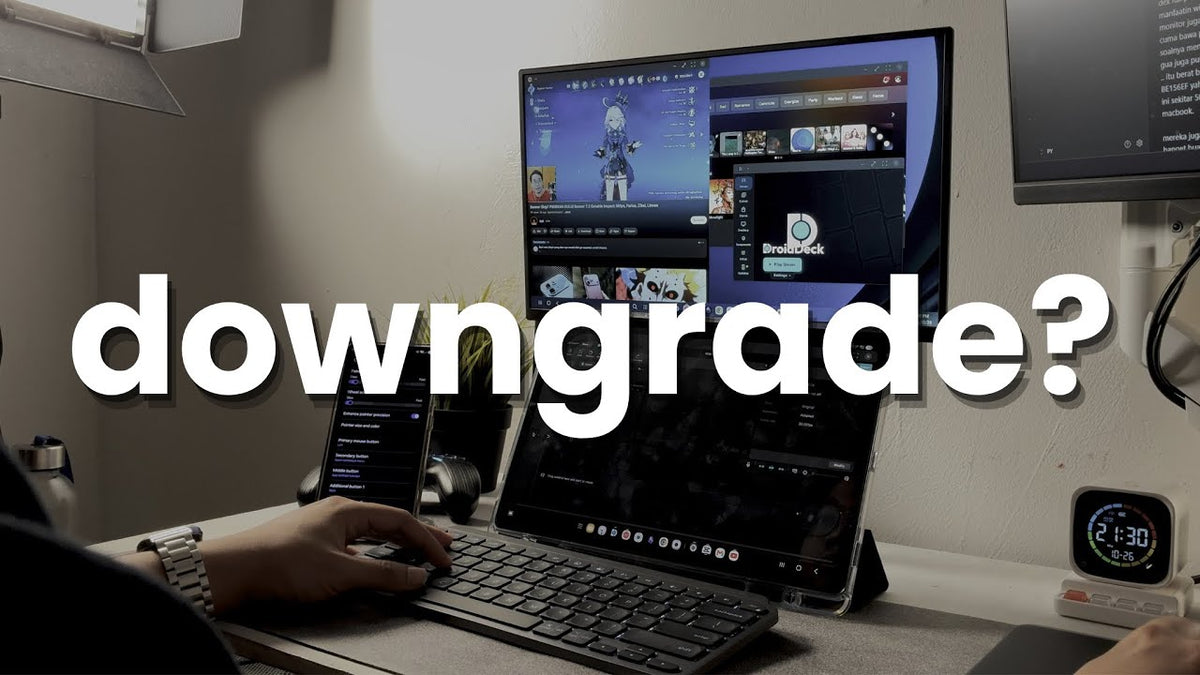
Welcome to the Pyurangi Channel. I once made a video about Samsung deck on the S25 Ultra, and I really love the DEX feature that lets our flagship phones be used for work by just plugging in a monitor, mouse, and keyboard. Your phone instantly becomes a desktop.
Then I saw the comments on my video, and a lot of people were already using this feature, and most said they use Samsung deck on their Samsung S series tablets. Some I even got the green line issue, right? I had a reflex reaction. Yeah, that's true. Why didn't I just buy a Samsung tablet?
Why I Sold My iPad Pro M4

For context, I just sold my iPad Pro M4, the video is in the top right corner. But maybe I'll summarize it briefly. There are 3 points why I sold the iPad.
First, because the specs were overkill, and since the specs were overkill, it was also overpriced. I always feel a sting whenever I think about the price. Second, because I already have many devices and having this iPad just meant I couldn't utilize it properly.
And well, if it were cheap, it wouldn't matter if I left it idle, but since it was just sitting there, it was a waste, so it was better to just let it go.
The Biggest Problem With iPadOS

And the third one was the deal breaker, which is the iPad OSA, I agree that iPad OS is just a blown-up version of iOS. So, if you want a desktop level experience, you might as well go with Mac OS.
I mean, even if you put an M4, M5 or M6 chip in an iPad, if it's restricted by the OS, if it's limited by iPad OS, what's the point?
Why I Chose the Samsung Galaxy Tab S9 Plus
Why I Still Needed a Tablet

But actually, I still need a tablet. So, I still need at least one device I can use to carry around besides my office laptop. Because that's a company asset anyway, not mine.
I need to have personal storage for my data or personal portable data. And by the way, I don't use a personal laptop, so I still need a portable device for work.
Choosing the Samsung Galaxy Tab S9 Plus

And my choice fell on the Samsung Galaxy Tab S9 Plus. If we're talking about being wise, the reason I chose DTA S9 Plus besides the setup features and my use case, which I'll share later is the price, man.
I got the tab S9 plus with 12GB of RAM and 256GB of storage for a low 7 million range price plus it already came with a pen. Of course I bought it used.
Finding a Used Samsung Tablet

Many people ask where I bought it or if there's a link. Honestly, guys, I only found this after diving through Threads, Carousel and Facebook Marketplace to get this price.
It was pretty hard to find, not like an iPad. There are many people selling Android tablets, but it just feels hard to find the specific one we want and want.
The downside is there are some scratches on the back body, but oh well, I don't really care about those small scratches as long as the internals are healthy.
Why Android Tablets Are Interesting in 2026
The Google Book Hype

Actually, the reason I want to switch to an Android tablet is because it's currently quite hyped up. It's called the Google Book.
Honestly, I see the reviews for the Google Book are interesting, but the price is really expensive. In my opinion, if you want to try a Google Book, you can start by buying an Android tablet, because from what I've seen in the reviews, the Google Book is basically an Android laptop.
Android Apps and Gaming Possibilities

It's basically like Samsung deck. It has the Play Store, so you download official apps via the Play Store.
The compatible games are also just Android games from the Play Store, say. Or if you want to play Steam games, we have Game hubs, native games, or we also have droid deck.
Droid deck is the best app of 2026. It's really great, like a Steam OS style experience on our Android.
Why the Snapdragon 8 Gen 2 Matters

Oh right, I forgot the reason I bought the S9 Plus instead of the Samsung S10, S11, or S12. Besides the fact that they are super expensive, I don't understand why an Android tab would cost that much.
What's that for? What's that for? It's because the S9 uses the Snapdragon 8 gen too, so we can install emulators, install what I mentioned earlier, Droid deck and play Steam games.
The possibilities for exploration are much greater if we use a processor from Q Qualcomm.
UPERFECT BE156EF Portable Monitor and Mobile Setup
Introducing the UPERFECT Portable Monitor

And before we continue the video, I should mention that I use this tablet for portability. Suppose you're like me, someone who is usually more productive using two monitors or feels the screen is still too small.
Even though the S9 plus is already 12.4 inches, you can still use an external monitor. if you want to carry it around, you can buy a portable monitor like the one sent from UPERFECT.
This is the UPERFECT BE156EF, a 15.6 inch portable monitor. The nice thing is that this monitor supports wireless via Miracast, plus it also has a battery.
Built-In Battery and Wireless Samsung DeX

If you've ever seen people working from cafes using external monitors combined with a mini-PC. The annoyance is actually having to sit near a power outlet to turn on that external monitor.
But since this has a built-in 8000 millimeter battery, it claims to last up to 4 hours of usage. So, if we're at a cafe and want to run Samsung decks to its full potential using a monitor, we can really utilize wireless decks.
Ultimately, I can also use this monitor for my S25 Ultra to launch Samsung decks as well. It's also great for me to carry everywhere because I find it relatively light compared to the laptop monitor I have from UPERFECT, which is insanely heavy, like carrying a laptop.
Portability and Dual Monitor Setup

This UPERFECT BE156EF is only around 800 g. So, if we carry a tablet, let's say 500 G's plus an 800G monitor, it really feels like carrying a MacBook, but the use case will be different later.
You can have a dual monitor setup. They also have this magnetic stand. This is great for a stacked monitor setup.
It's a separate purchase, but in my opinion, it's worth getting. they also provide base amounts on the back, so we just have to attach it.
Wireless and Wired Connectivity

The setup is also really easy, wireless, no cables, just set it up however you like. But take note, wireless can indeed be an advantage, but with wireless, you'll definitely feel some delay, like it's not quite right, right.
That's why you can just use a type C cable that supports display output or use HDMI as well. I prefer using a short type C cable that I can connect to my tablet.
Keyboard and Trackpad Experience

The monitor is also bundled with a keyboard and trackpad that can be folded like this. so, the portability is really great.
I'm also showing my full setup when using a portable monitor outside. I, but honestly, I'm not a fan of this keyboard trackpad combo from them because first of all, the keyboard layout is very strange.
The space bar is split and the Windows key is on the right side. It's quite weird, honestly. Then this trackpad also doesn't feel good, so my advice is to just use a mouse, but for emergencies, it's nice to have, have, plus this was a bonus from buying the monitor anyway, so I have no complaints, we got it for free anyway.
Samsung Galaxy Tab S9 Plus Display and Productivity
Screen Size and Dual Monitor Experience

Let's continue talking about the tab S9 plus. If we use a dual monitor setup, the size difference isn't that jarring because, as I said, the screen size is 12.4 inches.
Honestly, I feel that tablets over 11 inches are too big for me. But that thought will change as you work or play on this tablet. Somehow, it just feels right.
Choosing Between Small and Large Tablets

Indeed, in terms of portability, I prefer smaller tablets like the 8.8 inch ones such as the iPad Mini or Lenovo's tablet, but that's only good for portability.
When it's used for work, it's still a bit, you know, not very flexible. Small ones are really only good for entertainment and gaming, gaming.
If we use an 11 inch or 12-inch 1 like this for scrolling TikTok or IG, it really is too big, it really is too big. But if you used for multi-window, multitasking or editing, it's chef's kiss. It's really great.
Display Aspect Ratio

Maybe in terms of design, the thing I don't like is the aspect ratio. Yeah, if we compare it to an iPad, the Samsung feels really long, it's weird.
So, the aspect ratio uses 16 by 10. Now if we look at the iPad, its ratio is 4 by 3. It's boxier, more, what should I say, more aesthetic in my opinion.
But the good thing about this Samsung is that with a longer ratio, it's better for watching movies or YouTube because it's fuller compared to a 4 by 3 ratio.
Samsung Galaxy Tab S9 Plus Performance and Battery Life
Snapdragon 8 Gen 2 and Storage

Also, something to keep in mind, given it's about 3 years old, is how the performance holds up and the battery life, which I briefly mentioned in the specs at the start. Snapdragon HN 2, 12GBytes of RAM, 250 GB storage.
This is still plenty for 2026. Even though the storage is 256 GB, they still include a microSD slot. So we can always add more if we actually need larger storage.
Luckily there's still a micro SD slot, which is rare these days.
Gaming and Heavy Workloads

If you look at retro handheld gaming devices, they mostly use the Snapdragon 8 Gen 2, capable of running GTA 5 emulators or other AAA Steam games natively on the handheld. That should give you a good idea that the processor is still capable of handling heavy workloads, plus the 12 GB of RAM is definitely a plus.
So that's also a point in its favor. I tested playing Genshin Impact at max settings, and it handles it just fine, man.
But since I play it daily, I can spend 1 or 2 hours straight playing Genshin Impact. I usually set it to low, but I still keep it at 60 FPS.
Genshin Impact Gaming Experience
Genshin Impact is a game that's 6 years old now, almost at the endgame stage. We're already in Sennaya now.
I've quit a few times and come back, and I've never spent a dime on it. By the way, I'm F2P, but most of my characters are fully built, so now I'm just waiting for the banner.
Wuthering Waves Gaming Experience

I also want to test Wuthering waves. I used to play this game so much, it's a free to play AAA game that makes you wonder how it's even free.
Yes, there's a gotcha system, but it's mostly cosmetic and doesn't affect damage or gameplay at all. This game is quite demanding, but Wuthering Waves runs on Ultra at 60 FPS on this tablet.
And regarding the temperature, it gets warm right under the rear camera area, man. My advice, even if you can run these games on ultra settings, don't push it too hard. For mobile games, the most important thing is that it's playable and enjoyable.
DroidDeck and Linux Experience

As for Droid deck, I haven't installed any games yet, but I can install Linux via DroidDeck here and it runs smoothly, and I opened Firefox here as well, and it's perfectly fine.
Battery Life and Charging Speed
As for the battery, I feel like it's just a standard tablet battery used for gaming, it can probably hit 5 hours of screen on time, time. It's also nice that it charges quickly since it already uses 45 watt fast charging, assuming 32% power, that can reach 2 hours.
Meaning, assuming 100% power, it can definitely reach 6 to 7 hours of screen on time. Depending on usage, I use it quite heavily too, since I use it for gaming, and I mean for a 3 year old tablet, it's actually still OK, not really that wasteful.
Software Updates and Samsung Ecosystem

Software Update Support
Next, we'll talk about software updates as well. For a 3 year old device, the margin for upgrades is definitely getting thinner, tanner.
Samsung promised that the S9 series gets up to 4 major Android updates and security patches for up to 5 years. That means the estimated end is in August 2028.
Which in my opinion, if you're buying this for the long term and are very concerned about updates, is clearly a point of concern for you.
My Approach to Software Updates
But for me it shouldn't be, because for me, as long as the features I need are there, let's say in the current version of one UI, that's enough.
Even though I don't know if there's an update later that turns out to be amazing, I can only be envious. And so far, it still gets one UI9.
Why I Chose the Samsung Ecosystem
Besides that, I also want to talk about the ecosystem. One of the reasons I chose a Samsung tablet is because I still use the Samsung S25 Ultra as my daily driver.
I'm also curious about how powerful this Samsung ecosystem is. Although it's limited to phones and tablets, it's actually not limited to just the Samsung brand.
There are more universal connections later, for example, with other brands of Android phones or with a PC.
Universal Clipboard and Multi-Control
Maybe features like universal clipboard are already known to everyone. This has become the standard, the minimum for an ecosystem, copy from the phone, paste on the tablet, or vice versa.
Or there's also something called multi-control. For example, if the tablet is connected to a mouse and keyboard, well, later you can move the cursor to your phone.
At the same time, you can also drag and drop files to send the files you just copied. Actually, there are many others too.
Connected Devices and Quick Share
If you want to see the full list, you can click on connected devices. I'll just show you a little bit.
There are sharing features like Quick share for sharing files, there's music share or audio broadcast. This is more for sharing audio like a walkie talkie for an event, that's my assumption.
But this should be universal, it should work for other Android devices. Now this music share is more like an auto switch for buds, which will be below.
Music Share and Huawei FreeBuds

Maybe if you use Samsung buds, it's smoother. But if we use Music share and use DWS from another brand, for example, I'm using Huawei Free buds 4 I hear.
I can also switch my audio source between my phone and my tablet. Yes, for instance, if I'm listening to music from my phone, but suddenly I want to watch YouTube on my tablet, it can switch automatically, man.
I can set the pause and play controls from my phone. And since I'm using Huawei, the setup app is Huawei AI Life where I can adjust settings like noise canceling or the equalizer,
Cross-Device Audio Settings
Now I can set this from my phone and the TWS audio currently playing from the tablet will follow the settings from the Huawei app I have on my phone. This is awesome.
I don't know if this is exclusive to Samsung or how it works. Maybe some of you can confirm if it works on your own tablets or not. Feel free to share in the comments section.
Other Samsung Ecosystem Features
There's also call and text on other devices, but I don't use it because I rarely use phone calls or SMS. Indonesian people usually use WhatsApp for that.
Continue on another device, for example, if you're working on something on your phone, you can continue it on your tablet. Or there's also camera share to turn our phone into a webcam.
Sam. There's also storage here. I like this one. So I can access the file manager from my phone via the, the tablet.
Link to Windows and Second Screen
Linked to Windows doesn't even need to be asked. It's really great for connecting to Windows. I've already made a video about the Android Plus Windows ecosystem, ecosystem.
Then there's also a second screen for our Windows PC so we can use the tablet as a second monitor.
SmartThings and Connected Home
But actually, the thing that makes me curious about the Samsung system is this one, is this one, because here there is something called smart things, and Samsung has a lot of household appliances too.
For example, refrigerators, washing machines, I'm curious how seamless that would be at home. It's a huge goal of mine to have a home where all electronic appliances are connected to IOT and can be controlled remotely.
That would be really fun. Let's make a video about it next time. Amen.
My Personal Software and Storage Ecosystem

Notes and Productivity Apps
Regarding ecosystem software synchronization like Samsung Notes, Samsung Health, or Samsung Wallet, I don't use them because I already have my own ecosystem for notes.
I write for work or video scripts in Obsidian, which connects to my server via syncing, via syncing.
Photo, Video, and Personal Storage
Then for photo and video storage, I also have a NAS Aguard home and an expense tracking app. Everything is on my server as well.
I keep mentioning this server thing. I promised to make a video about it after this one.
iPad vs Android Tablet: Which One Should You Buy?

Choosing Based on Your Apps
For those of you who want to buy a tablet for the first time, sometimes there's a question, is it better to get an iPad or an Android tablet?
Actually, you're the one who knows the answer. Basically, check if the apps you want to use are supported on iPad OS or Android.
You can tell just from that, really, really. For instance, if you need Procreator Final Cut, the answer is clearly on the iPad, the.
When Android Tablets Make More Sense
But if you like to explore, tinker and prefer a desktop-like interface, Android is the wiser choice.
For me, the deal breaker with iPad OS is Safari Man. A browser where I can't get a true desktop experience and the external monitor cursor has a bit of a delay.
I don't really like how it works on an external monitor.
External Monitor Experience
By the way, it's the same on this tablet. The external monitor is capped at 60 hertz.
But at least I like Samsung decks, which makes my tablet feel more like a desktop or laptop, even without an external monitor.
Final Thoughts and Channel Discussion

I'm also confused, just like you said, is my channel becoming a how to leave the Apple ecosystem guide or not, guys?
It's just a coincidence that I used to use Apple products and then I just got some new toys to play with. So yeah, I wanna say that I do like Apple products.
I used to be a designer after all. Seeing Apple's product design just really satisfies my eyes. It's different from when I look at other products that feel a bit me or just too nerdy. But it really depends on the situation.
Now that I'm back into technical work and my needs have changed, that's when I start feeling those Apple limitations.
Share:
UPERFECT UD14BQ QLED Pen Designer Monitor Reviewed by FifiMangaka
UPERFECT BE156EF 15.6" Wireless Display Reviewed by TECHOSAUR