

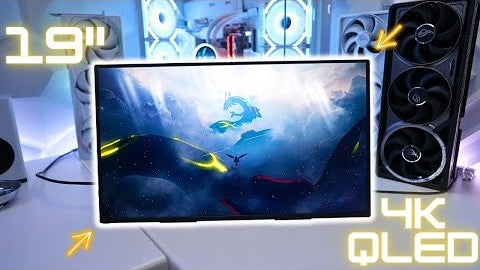
This is the new UPERFECT GR19BU (UColor Apex) that comes with a massive 19-inch 4KQ LED display. That's right, this Apex monitor uses quantum dock technology to give you better color depth and higher brightness that standard LCD panels simply can't match. You also get a fast 144 Hz refresh rate and built-in freezing support for smooth, tear-free gaming, which is perfect for PC and console gamers.

Looking for an awesome 4K monitor that you can take on the go. There are dual USB-C ports and a mini-HDMI port, which makes connecting any device easy and seamless.
One of my favorite features of the Apex is a built-in kickstand that is super sturdy and supports multiple angles which you could use vertically, plus there's descent mount support in case you'd want to mount it on a monitor arm instead.
Huge thanks to UPERFECT for sending this monitor to me and sponsoring this video so I showcase to you guys. It has a retail price of about $540 which is pricey, but trust me guys, you can get it for way less because UPERFECT is hooking it up with discount codes on top of their current sale price that I'll link down below.

Why QLED Technology
So why QLED? Well, QLED takes everything you already get from a standard LCD, but now you get a nice boost in visuals using a Quanta dot layer. That elevates color and brightness. You get way richer, more vibrant colors that actually pop off the screen, even in bright rooms. And when you're gaming or watching HDR content, QLED delivers that punchy, high-impact look that is a noticeable improvement over LCD.

Color Accuracy & Pixel Density
The Apex is rated at a 107.8% DCIP3 color gamut for amazing color accuracy, and when you combine that with a 4K resolution, you end up with an insanely. High pixel density of about 232 pixels per inch, giving you razor sharp clarity where text, icons, and visuals look ultra-clean with zero visible pixels.

Technical Specifications
Now, taking a deeper dive into the specs, this monitor has a 9-millisecond response time, a 16 by 9 aspect ratio, 400 nits of brightness, dual 1-watt speakers, and comes weighing in at 3.07 pounds.

Unboxing Experience
So, with all of that out of the way, All right, when you get your apex, it'll come in this awesome white User box. So, let's go ahead and see what we get inside. Just take the plastic cover off. All right guys, then we have the U Color 19 Apex.

First Impressions
It's definitely a very large sized portable monitor, but I do like the fact that it is very, very thin as well. And I absolutely love the integrated kick stand that this comes with, which will make it very easy to sit on top of a table. I'm gonna put this aside for now.


Box Contents
Now, further inside the box, we're gonna have a user manual, followed by Visa mount screws, which is awesome because The Apex does support Visa 75 by 75, which is great if you ever wanna have it on a monitor arm. Next thing you're getting are two USB C2C cables, followed by a mini-HDMI to HDMI cable, and finally, a USB-C power adapter.

Design & Build Quality
All right, so going back to the Apex, I'm gonna cover the design of this portable monitor and what I really love about the design of this monitor is that it is all black. And also on the front, we have slim bezels on all four sides, and another great thing that I like is that we have no logos in the front, so I love the fact that UPERFECT went with a more ceiling design all around.


Kickstand Mechanism
Now, as you can see, even though this is a 19-inch screen, it is still very thin with the bottom portion having this little hump here that houses all of the inputs and controls as well as the built-in kickstand. And so the built-in kickstand is gonna be right here, right on the bottom here, and you just have to lift this up and this whole thing can Open All the way to the back. Which is great if you're planning on using the Visa mounts, this will be out of the way or in case you wanna have the portable monitor lying flat.

Stability & Viewing Angles
Now, another great thing about this stand here is that it is very sturdy and as you can see, it does take a considerable amount of force to move this, and this is great because if you have the apex sitting on the table, it's gonna support multiple angles. And then so as you can see, I can have it. Like this, for example, and it still stays. Keeping the angle, which is incredible, and you can also have it vertical, but just keep in mind that it is very unstable, so just keep that in mind here.

Ports & Controls
Now, another thing to note here is that when the kickstand is fully closed, it's gonna block all of the controls and the inputs as well. So, if you want access to that, you are gonna have to open the kickstand, and once you open the kickstand, it's gonna reveal all of the inputs here, which we get a mini HDMI port and two USB-C ports. So, we have a lot of versatility to connect multiple devices, which is really nice. And then on the opposite side, is where we have all of our controls, and I also like the silver accents on these buttons as well.

Audio & Extra Features
We also get a 3.5-millimeter headphone jack right over there, and we also get this USB OTG port right over here, which will allow you to connect USB devices, which is really nice and unique. And finally, this does come with built-in speakers and the The holes for those speakers are gonna be right on the bottom as well. You can see we have dual speakers. It's gonna be really nice and convenient.

Portability Advice
So overall for the design, I really like it. This being a nineteen-inch screen, it is very easy to carry. The only thing I will say is that if you are going to carry this on the go, I recommend getting yourself a carrying case. That way you don't have any type of scratches on the screen. That's the only thing that I recommend that you get.

PC Gaming Performance
So what's it like gaming on PC using the UPERFECT UColor Apex for a Portable 19-inch 4K monitor. I think the Apex delivers amazing visuals thanks to QLED and since this monitor has FreeSync support, it just makes gaming ultra smooth with no screen tears. Just keep in mind that you'll need to turn on FreeSync in the menu settings, and if you have an Nvidia graphics card, you'll also need to manually enable G-Sync for it to work.

PC Setup & Performance Notes
Now, I'm using my RTX 5090 gaming PC connected with the included mini-HDMI to HDMI cable and a. Separate USB-C to power the Apex monitor. Now for fast-paced gaming like Battlefield 6, you might be better off with UPERFECT gaming line of monitors that have 1440p resolution, and a higher refresh rate count, which is also less demanding than 4K. But if you have the hardware to handle 4K, then the Apex is straight up fire.
Speaker Performance
The dual one-watt speakers sound pretty decent for a portable monitor and I have the gaming volume set to normal so you can listen.

Console Gaming Support
Now for my console gamers, the Apex will be able to support variable refresh rates all the way up to 120 hertz and 4K resolution thanks to the Apex's HDMI 2.1 support. You're gonna have to enable Free sync in the menu settings of the Apex in order for VRR to work on the PS5 or Xbox Series X.

High Frame Rate Gaming
Now this is huge for fast-paced game titles like Marvel Rivals, letting you enable HFR mode which allows the game to run at up to 10. 20 frames per second, giving you not only smoother gameplay, but also tear-free gaming with VRR.

Aspect Ratio & Power Efficiency
Another plus is that this monitor has a 16 by 9 aspect ratio, so there's no black bars on top or bottom that you'll normally see with 16 by 10 aspect ratio monitors. Now, the Apex runs at about 16 watts of power, so you can actually use the USB-C port on the front of your console to fully power this portable monitor without the need of using a. Separate power supply, which is awesome.
Productivity Use Case
If you're planning to use a portable monitor alongside your laptop, the Apex does an amazing job of giving you more screen real estate and boosting productivity instantly. On my MacBook Pro, a single USB-C cable delivers the full 4K re. Solution and a 144 Hz refresh rate, making everything feel incredibly smooth and responsive. And because it's a true 4K panel, Mac OS scaling looks perfect, giving you crisp, high DPI options that keep your tech sharp, your UI clean, and your workflow looking way more premium compared to lower resolution portable displays. I personally like to keep the Apex in a vertical position alongside my MacBook Pro for amazing. Productivity.

Menu & Settings Overview
All right, so now I wanna cover the menu settings on the Apex and of course, to bring up the menu, it's gonna be on the right side with all of these buttons over here. To bring up the menu icon is gonna be the 2nd button over here and then you have your controls on top.

Picture & Game Settings
So, click on that button, we'll bring up the menu setting and the first option we have is gonna be your picture settings. Here you can adjust the brightness, contrast, black levels, and if you ever want to enter, you hit the menu icon again. the 3rd button will scroll down. You can go all the way down to game mode, for example, select on. And then you can switch between standard, FPS and even RTS, whichever one that you happen to like.

Advanced & System Settings
The next option is switch. This will switch the resolution. I recommend leaving things standard. Then over here we have color effects. You can adjust the saturation, hue level, sharpness, and even rotate the display if you needed to. We have information of the input. We can also reset all the settings, and over here is our advanced mode. Now by default, we have ultra HDR mode set to automatic, and what that means is that if it ever detects HDR it will automatically turn that on.

Eye Care & FreeSync Settings
Next, you have eye protection. If you set that on, it'll basically reduce the blue lights. you also have the ability to enable 3D sound and over here we have FreeSync. Now by default, it is set to off, so whenever you wanna have variable refresh rate on your PC or gaming console, then you wanna make sure you turn this to on.

Final Verdict
So is the UPERFECT UColor Apex worth picking up even at its $540 price tag? Well, if you want a portable monitor with stunning cute LED color, sharp 4K resolution, and a larger 19-inch screen, the Apex instantly stands out as one of the best. Options you can get in this size range. Yeah, it's pricey, but this is one of those displays where paying more actually gives you a noticeably better experience like sharper visuals, more workspace, and colors that just hit different.
Recommendation & Closing
Between the color accuracy, the sharpness of 4K, and the versatility of a nineteen-inch screen, the Apex delivers that perfect balance of productivity and entertainment. I highly recommend the UPERFECT UColor Apex. If you're interested in getting this monitor or the mini tech that you've seen in this video, I will have a few links down below which also helps.
Share:
UPERFECT BE14BQ (UColor M1) Mini LED Portable Monitor Reviewed by Kei's Retro Gaming
UPERFECT GR19BU (UColor Apex)19 Inch 4K UHD Monitor reviewed by Teoh on Tech