

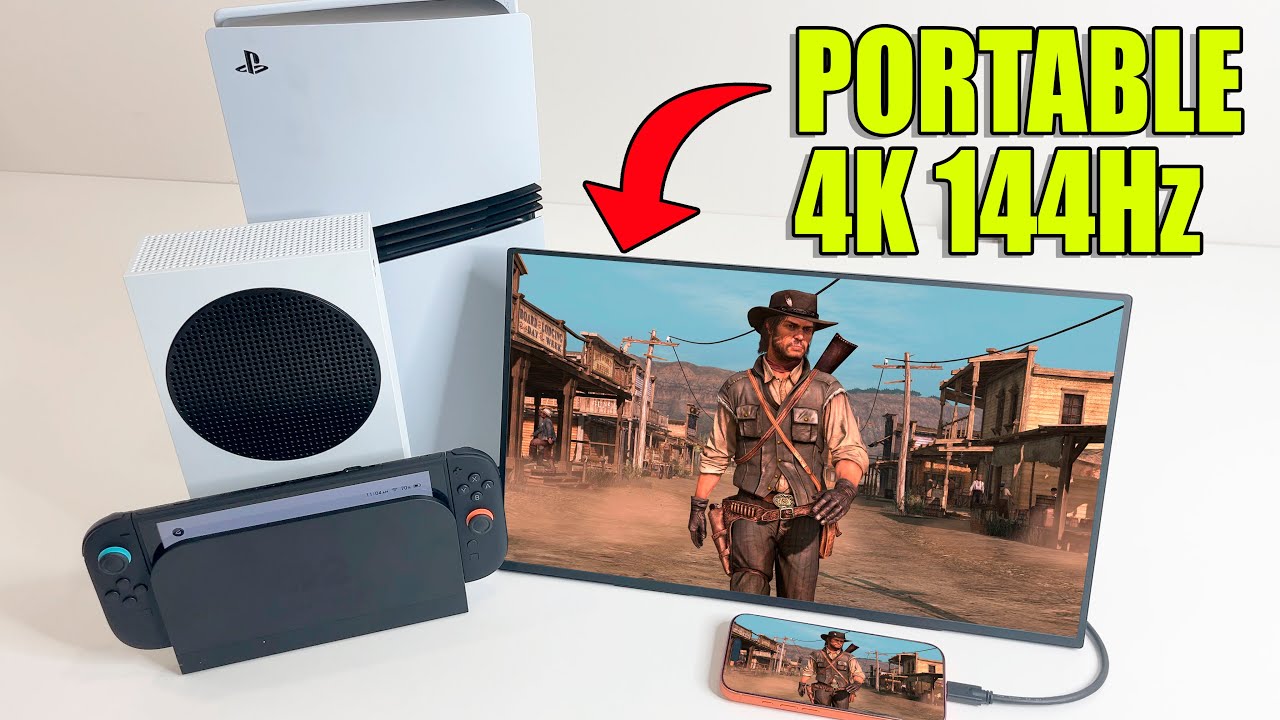
Portable monitors for me, they're really a must-have, especially for those that travel or even those that like to move their setup around the house and maybe even if you want a small portable setup rather than something bulky.
Display & Compatibility Overview

This latest portable monitor from UPERFECT is 4K 144 Hz with a QLED display. It works with everything, gaming consoles like Nintendo Switch, Nintendo Switch 2, Xbox and PlayStation, handheld PCs like the Steam Deck, even mobile phones. Like iPhone 17 Pro, and of course for those that want to get some work done, it'll connect with your laptop or MacBook.
Special Features & Model Introduction
This monitor even has a special optimized mode for Switch one and Switch two. This one's a GR19BU (UColor Apex) from UPERFECT. It has a 19 inch QLED display with 4K resolution, 144 Hz refresh rate, and HDR. There's a link in the description if you want to check the price, but it's for sure one of the best bargains for a 4K high refresh rate.


Unboxing & Accessories
Display packaged nicely here, break those seals, and here's what you get. Here's the monitor itself. I'll look at that in a minute. There's a user manual with all the setup instructions, power adapter here as well. There's 3 cables included 2 USB-C cables. One is for powering the monitor. You can also use the other one to directly connect it to Nintendo Switch, Game Deck, laptop, and other devices that have a USB-C output. Also included is the ATMI cable for connecting. Connecting it to literally everything including Xbox Series S and PS5 Pro. It also comes with 4 mounting screws in case you want to put this on a monitor stand.

Design & Build
Here's a monitor. It's really thin and sleek as well. It's also fairly light. There's a built-in kick stand on the back. There's 2 built-in speakers on the bottom here and on the side are all the inputs. We got 2 full function USB-C inputs and 1 HDMI input. On the other side, there's audio out. There's also all the buttons. To turn the gaming monitor on as well as control all the settings, you can control the brightness, the volume, all kinds of different settings here you can play around with. It does come with a built-in kick stand, sort of swings open and you can have it set up at the exact angle you like. The stand's fairly stable. It's not something flimsy, it's gonna stay in place.

Gaming Setup
Nintendo Switch Setup
Now it's time for the fun part, setting this thing up and showing off some gameplay. I'm gonna start with the Nintendo Switch consoles. All the Switch consoles are gonna. Work here, except of course the Switch light. The Switch one or the Switch OLED can directly be plugged into the monitor. You don't even need to carry around a dock. Power the monitor using one of the USB-C ports and the other USB-C port can be directly connected to the Nintendo Switch. You can even use the official Switch one power adapter on this monitor. The setup works perfectly. For someone like me that travels a lot. I don't even have to worry about carrying around my Switch dock. This has. To be the best portable on the go gaming setup. Nintendo Switch does charge here while you're playing.

Nintendo Switch 2 Setup
Next up is Switch 2. This, I wasn't sure if it'll work here without a dock, and you can see connecting it directly to the monitor without a dock, it doesn't work. We do need to use Switch 2's dock here and connect it using the mini HCMI cable that's provided. I do have the Switch 2 dock, and it is powered using the official Nintendo adapter, but I wanted to see if I can power the. Monitor using one of the USB ports on the side of the dock. And guess what? I can. That'll save you from carrying around extra power adapters. I was a little worried here though. The resolution shows 720p and there's no sound, but nothing really to worry about. I just had to change the mode here from standard to switch to. With that correct mode, the monitor switches to 4K. There's sound, it works perfectly. 4K up to 120 Hz with HDR. Games like Metroid Prime For Beyond at 120 Hertz works perfectly here. There are other games, of course, Hades 2 and Hollow Knight Silk Song that also take advantage of that higher 120 FPS. Keep in mind here that 120 Hz mode on the monitor actually automatically switches to 1,440p output resolution, playing split screen Mario Kart World here. That's another advantage of having a portable monitor for gaming on the go when you're traveling.

PlayStation 5 Setup
Next up, let's use a. PlayStation 5 console setting up again using a mini HCMI cable you can see the full resolution capabilities of the monitor. PS5 does recognize it as 4K and as well as 120 Hz. Now similar to Switch to that 120 Hz is only possible with resolutions up to 1,440p. So you can either go 4K 60 Hz or it'll automatically switch to 1,440p and 120 Hz when you go into a game that kind of supports that 120 Hz. mode. Here's Fortnite on PlayStation 5. Have a look at that top right corner. You can see the FPS calendar and the game's running at 120 FPS. This really is the perfect monitor for traveling while taking full advantage of the PlayStation 5 Pro's capabilities.

XBox Setup
The last thing I want to show here is the Xbox Series S and Series X, similar to what we saw on the Switch 2 and the PS5. The Series SNX can do 1,440p and 120 Hz or 4K and 60 Hz with this monitor. Playing Call of Duty Black Ops 7 here, some endgame gameplay, with all of that, you can really see the versatility of this portable monitor.
Usage Scenarios

Content Creation Use Case
For me personally, I need to capture gameplay and create content even when I travel. So this type of monitor is really a must-have for me. I can literally pull this out at the airport or in an airplane while traveling and easily. Create some content.

Mobile & Handheld Connectivity
I mean, really, you can pretty much use it with everything, even something like iPhone 17 Pro works well. Here I have it connected directly using a USB-C cable to screen mirror on the monitor that lets me play some Red Dead Redemption mobile on a bigger screen. This setup works really well, especially with the Xbox controller, really turns my phone into a gaming console. Just to sort of show you here, I also have my Steam Deck connected. The monitor is really gonna work with all other PC handhelds as well. The Xbox handhelds, the Rogue Alley, all kinds of portable PCs are gonna work, and it of course works.

Laptop & Work Setup
With a real PC as well here I have it connected directly to my laptop. This right here is a truly portable setup. I have no power connection whatsoever, not even on my laptop. You can see it's a completely clean setup, no wires. I personally use this setup quite often to get some work done, to do some editing for my videos while I'm traveling.

Power Bank Setup
Now one more thing I wanted to try out here using one of these power banks to power this whole entire setup. So I have. My Switch one console, the UPERFECT portable monitor, and a power bank. Here it is all set up and working perfectly. Completely portable on a bigger, larger screen.
Conclusion
And that, my friends, is everything you need to know about the UPERFECT GR19BU (UColor Apex) portable monitor. A really good choice if you want something with high-end specs, 4K and 140 Hz refresh rate.
Accessories
UPERFECT also sent me some accessories. They sell all kinds of accessories for monitors. I got a few things. There's these connectors, they make organizing your wires behind the monitor really easy. There's ones for those USB-C ports as well as one for that HDMI port. I also got this adjustable monitor mount. It was super easy to set up here and has a lot of flexibility to it. And then there's this carrying case. I personally use it when I'm traveling, makes it easy to protect that monitor when I'm on the go.
Share:
The UPERFECT BE16CU (UColor T6) Review by Gadgets Guardian
The UPERFECT GR19BU (UColor Apex) 4K reviewed by Kit Betts-Masters