

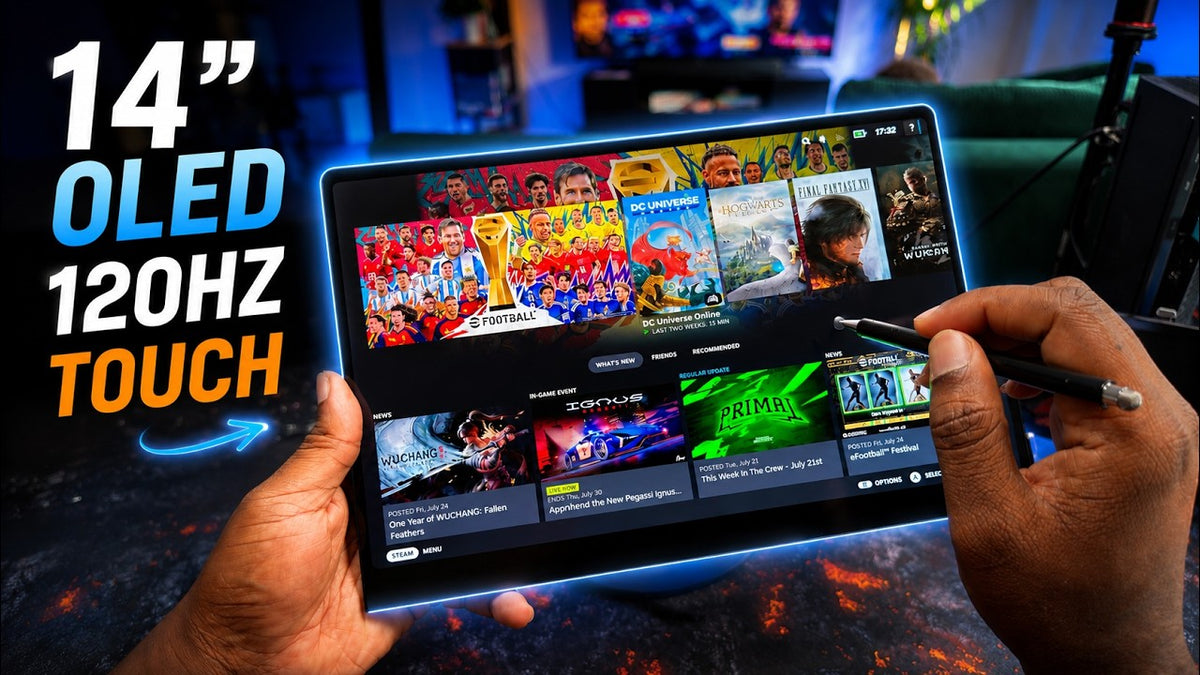
This right here has to be the most insanely good portable monitors that I've personally tested for a Windows handheld PC. And surprisingly, that's not just because it has a UPERFECT GR14BU 3K OLED display or even a 120 Hz refresh rate. The main reason for me is actually simple. This is finally a portable OLED monitor with a touch screen that actually works really well.
I've spent the past few days using this monitor mainly with my handheld gaming PC connected to my EGPU and occasionally, of course, with my MacBook Pro, and honestly, this might actually be the first portable monitor that I've enjoyed using exactly the way I always wanted to.
Now visually as you can see, it looks fantastic and in person, I'm gonna tell you, it looks even better. The touch screen genuinely changes how I use my handheld setup, but there are also a few things that you need to understand before deciding whether to pull the trigger to get this portable monitor.
So, let's take a closer look.
Design & Build Quality

Overall Design
So, to start with, let's look at the design of this monitor. It has an all black glossy finish with smooth curved edges.
I really like the fact that UPERFECT didn't print a large logo across the front just like all the monitors. And it keeps everything looking clean and minimal.
It also matches the design of my Rory surprisingly well, which is something I really appreciate when both devices are sitting next to each other.
Build Quality & Portability
The chassis is made from aluminum. It's only around 7 millimeters thick and weighs just 590 g. And even though you're getting a larger 14 inch display, it's still extremely easy to carry around.
And honestly, I think 14 inches is the perfect size for something like this. It's noticeably larger than the display on a handheld PC, but it doesn't become awkward to pack or position on a small table.
Kickstand & Mounting
You also have an adjustable kick stand built directly into the back, which is really nice to have.
But apart from that, I've been using it with this adjustable monitor arm, which allows. Allows me to elevate the display and position it at a much better angle, especially when I'm using the touch screen or my touch pen.
Ports & Connectivity

Port Selection
Moving over to the ports, all the menu controls are located on the left side of the monitor.
On the right, you're going to find two full featured USB-C ports that can handle power, audio, video, and touch data. You also get one mini HDMI port as well.
One-Cable Setup
Now the simplest way to use this monitor is with a single USB-C cable.
I can connect it directly to my RUU 3 or to the USB-C output on my EGPU, and that one cable carries the video signal, audio, touch control, and power, and that's exactly the kind of minimal setup that I wanted.
Brightness & Power
Now, when using only one cable, the monitor usually starts at 20% of brightness. I can manually increase it to 100%, but in my experience, the display still appears brighter and more consistent when I connected a separate power through the second USB-C port.
So yes, one cable operation is absolutely possible, but if you want the best brightness, I would connect the included power adapter as well. And of course, there is no internal battery on this monitor which helps explains how you are managed to keep the weight this low.
The monitor is rated at 15 watts, and that power has to come from either your connector device or a separate power source.
Display Quality

Resolution & Sharpness
Now let's talk about the display itself because this is where things get really interesting. Now, this is a 14 inch OLED panel with a 16 by 10 aspect ratio and a resolution of 2880 by 1800.
So that gives it a pixel density of around 242 pixels per inch, which is extremely sharp for a monitor of this size. I placed it side by side with my 14-inch MacBook Pro and.
From a normal viewing distance, I could hardly notice a difference in sharpness, and as a matter of fact, I could argue that this monitor actually looks better overall.
Text look incredibly clean. Interface elements are well defined and. Resolution videos looks fantastic. And because this is an OLED panel, you also get true blacks and of course excellent contrast.
Games look rich and detailed, especially during darker scenes, and the glossy finish makes the color appear even more vibrant.
Glossy Finish
But of course, the glossy finish also comes with a downside. If you're sitting opposite an open window or you're trying to use the monitor outdoors during the day, reflections can actually become very distracting.
This monitor is definitely at its best at nights or anywhere that you have some control over the lighting.
Now personally though, I still prefer the glossy finish because of what it does for the image. Colors pop, black looks deeper, and games have that premium OLED appearance that you simply don't get from IPS portable monitors.
Color Accuracy
Now UPERFECT advertises wide DCIP3 color coverage and a Delta E below 2.
Haven't independently verified those figures with professionally calibrated equipment, but skin tones look natural and the colors don't appear excessively shifted.
Refresh Rate & Color Depth
Also, you can run a monitor at 120 Hz through USBC and it feels extremely smooth when navigating windows, scrolling through the applications, or playing faster games.
Now I've also noticed an interesting. Trade-off inside window and that's the fact that when I, you know, set the monitor to 120 Hz, my system reports an 8-bit color output, but when I reduce the refresh rate to 100, the windows just show me 10 bit output signal.
Now, the official specification described this as an 8 beat plus FROC panel, so it isn't a native 10 bit display.
But personally, I still prefer running it at 100 Hz with the 10 beat output option enabled, and that's because 100 Hz still feels very smooth and I get better looking gradients and slightly richer color reproduction.
Touch Screen Experience

Windows Touch Experience
Now, as I mentioned at the beginning, the touchscreen feature of this monitor is easily my favorite feature, and honestly, it's the main reason this monitor feels different from the other portable OLED displays that I've tested.
Now, this is a 10 point multi-touch display, so you can tap, swipe, scroll, drag and pinch to zoom just like you would on a tablet.
And when my Iheo 3 is connected, I can control Windows directly from the monitor without constantly reaching for the handheld or connecting a separate keyboard and mouse.
I can launch games, navigate through. Windows, change settings, close applications, and of course move between different menus directly from the screen, and that makes the entire setup feel much cleaner and more importantly, genuinely portable.
Touch Pen Support
I also bought a compatible touch pen from Amazon and so far it has worked really well. I can use it for basic navigation, timeline control. And of course, make more precise selections inside supported applications.
It's obviously isn't going to replace a proper professional drawing table, but for navigation and you know, general editing controls, it works extremely well.
MacOS Compatibility
Now, there is one little, I'll say, limitation with this portable monitor, and that's the fact that Mac OS doesn't properly support. The touch screen.
Now my MacBook Pro sometimes, you know, register basic clicks, but multi-touch gestures and overall tablet-like experience does not work properly on my MacBook.
And UPERFECT also officially lists the touch functionality as unsupported on Mac devices.
So if the touch screen is the main reason you're considering getting this monitor, just understand that it makes much more sense when paired with a Windows device.
Gaming Features & Limitations

FreeSync
Now, in addition to that, there is no free sync support, which I. Completely understand may be a deal breaker for some people.
I expected the lack of variable refresh rate to bother me more than it actually did, but after spending time gaming on this monitor, it hasn't been a major problem for me, I would say.
HDR
Now, there's also an HDRO option inside the monitor's on-screen menu, even though UPERFECT officially released HDRO as unsupported on its website.
I tried it and honestly, I would just leave it switched off. The monitor on its own looks much better in SDRO.
Colors appear more natural and consistent, and the OLED contrast already gives the image plenty of depth without enabling HDR.
Of course for me it's strange that the option is included in the menu, but I wouldn't consider HDRO one of the reasons to buy this monitor.
Speakers
The monitor also has two built in 1 watt speakers.
Now, I'm glad that they are included because they can be useful when you need them, but sound quality isn't one of the highlights of this monitor.
Extra Transcript
TI with 16 gigabytes of VRA. So now, when wants more than 20 minutes, and wants a more demanding experience box is a desktop G4 RTX 5060 TI with 16 gigabytes of VRA. So now, when wants more than 20 minutes and wants a more demand.
Final Verdict

So overall, I think This is one of UPERFECT's best portable monitors so far, and it also feels like a proper evolution of the previous UColor 02. The design is cleaner, the integrated stand is more convenient, and adding a touch screen makes it far more useful with a Windows handheld PC.
And I think this monitor makes the most sense for handheld gamers, frequent travelers, content creators, and of course anyone who wants a premium portable display but isn't ready to switch to XR glasses.
Share:
UPERFECT GR14BU Portable Monitor Touchscreen reviewed by Hubwood
The UPERFECT GR19BU 19 Inch 4K UHD Monitor reviewed by NoodleNick