

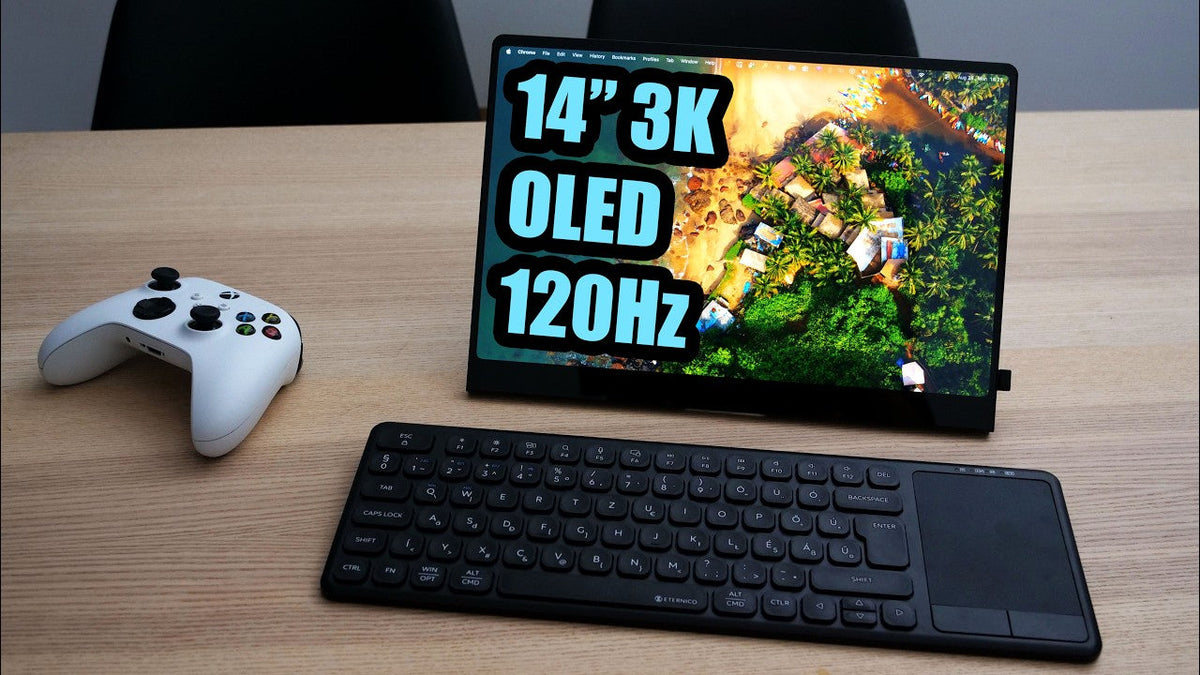
High pixel density UPERFECT GR14BU 120 Hz OLED panel and touch support all packed into a 14-inch portable monitor that perfectly matches the footprint of a laptop or even my tablet. We reached a point where the image quality of a portable monitor will statistically speaking likely be better than the display of a laptop.
First Impressions

Generally external monitors aren't really my main thing, and I was planning to pass on reviews like this for a while, but when I saw the. On this thing, I just had to test it out for myself. My first thought was, this is it. We've reached the peak functionality for portable monitors, and it will be hard to compete with this one. But after using it for a couple of weeks, I can tell that there is definitely room for improvement, but it also gets a lot of things right.
Full disclosure, this monitor was sent to me for review, but as always, there is zero brand moderation. They'll be hearing my final thoughts at the exact same time as you do.
Unboxing and Included Accessories


The unboxing experience is pretty generous. Besides the monitor itself, they include two Type C cables, one dedicated for power, along with power brick up to 30 watts, and a high-speed USB 3.1 cable for both display and power.
If your device doesn't have Type C. They've got you covered with a USBC to USBA cable and the mini HDMI to HDMI cable.
Design and Build Quality
Lightweight and Portable Design

Monitor itself is quite light, weighing in at just 660 g, and fairly thin, especially towards the top. There's a built-in kick stand on the back that does the job perfectly and holds up very well.
Control and Button

However, some design flaws are still present, particularly with the controls. My complaint remains the same. There is no labeling to tell you what each button does. Because of this, I frequently ended up accidentally turning the screen off when I was just trying to adjust the brightness. And when it shuts down, the settings get reset, and I have to start all over again.
OLED Display Quality
Glossy Panel and Image Quality

The panel itself is glossy, which has its pros and cons depending on your setup and personal preference, and I like it more since my window is far away. And it also just gives you this sharper, crisper image, and the image quality on this glossy OLED panel is as expected top notch.
I won't sing praises to OED here, as I think everyone knows its strong points by now. You're getting exactly what you'd expect from a good OLED display.
Comparing It with An OLED Monitor

I placed it right next to my rather expensive OLED monitor, and honestly I couldn't tell the difference. Both look spectacular.
Outdoor Visibility

For a portable monitor, a glossy finish can be a downside if you plan to use it outdoors, where reflections might get in the way. On the other side, the screen gets fairly bright, so visibility remains solid.
Brightness and Power Delivery
Brightness Limitations

But there is a catch. If you connect it using a single type C cable. Power delivery is limited, which caps your maximum brightness. In my experience, the brightness is plenty for indoors use, but if you want to use it outside in direct sunlight. Maybe you'll need additional power source.
External Power and Pass-Through Charging: It's kind of funny, but actually super convenient that once you plug external power to the monitor, it not only gets brighter, but it also starts pass-through charging to your main device.
Power Consumption and Cable Management

The power consumption is really good. I mean 10 watts at 100% brightness. But that way we can see too much cables, and if you want to hide them, you can buy some neat little right angle adapters separately, which makes the whole setup look much cleaner.
Resolution, Aspect Ratio and Pixel Density

The aspect ratio is 16 by 10 with a resolution of 2880 by 1800. That gives us 242 PPI. The image is clean and even while working with text, I didn't notice any green or red subpixel fringing. But if I look really closely with the camera, I can spot it. But don't forget it also has 120 Hz of refer for it, and it easily can be a gaming monitor as well. Hooking it up to my Xbox through a cable, it ran at 1,440p at 120 hertz, but that's because Xbox works in 16 by 9 aspect ratio.
Speakers and HDMI Limitations
Built-In Speakers

By the way, I should also mention the built-in speakers. The sound is, well, it exists. It will cover you if you have no other audio source.
HDMI Refresh Rate Limitation
Keep in mind that if the monitor connected by HDMI cable at full resolution, you'll be kept at 100 Hz, and swapping cables doesn't fix this because it's limited by a mini HDMI port.
VRR, HDR and OLED Care
VRR & HDR Support


There is no VRR, but honestly, VRR on OLEDs is a whole separate issue due to dark scene flickering. I actually turned it off on my main monitor anyway. So it's not a big loss for me. It does, however, support HDR, which you can toggle in the monitor's OSD.
OLED Care and Burn-In Concerns
I have a mixed feeling over the lack of OLED care features, something I used to have on my main monitor. Over a year of use, I still have zero signs of burning because I'm using those functions. Not sure how it's going to be here.
Then again, the monitor unboxed has run brutal burning tests on modern OLEDs. And it took a very long time for any retention to show up, so perhaps it's not something to worry about.
Touchscreen Functionality
Touch Support on Windows, MacBook and iPad

Touchscreen functionality works via the Type C cable and predictably works fine on Windows, but touch won't work on a MacBook, which is whatever. But it also won't work on an iPad, which is a bummer because that would have been a really cool setup.
Touch Over HDMI

If you're connecting via HDMI, you'll need to plug in the type C 2 USBA cable to get the touch interface working. I was actually surprised that this cable was enough to power it when connected to my PC. I did get this weird flickering temporary, but it went away and hasn't come back since.
Touchscreen Coating
I do have a complaint about the homophobic coding, or lack of it. It feels like you're dragging your finger across a standard non-touch screen, making the touch experience pretty unpleasant. If you plan to use it a lot, I recommend finding a screen protector with the proper coding.
Price and Value
The monitor isn't cheap at the time of recording. It goes for $400 though they did provide me with a promo code that knocks the price down a bit.
It's hard to say whether that's too expensive, given it falls into a pretty niche category. Top tier specs packed into a 14-inch portable display.
At the End

I'm genuinely curious if you're considering this monitor, how do you plan to use it? Will it be the main monitor for a minimalistic setup, or do you travel a lot and prioritize the image quality on the go?
Personally, after recording the review, I replaced my nineteen-inch 4K monitor, also from UPERFECT, with this one. Since I don't always need it turned on, and with an OLED, I don't even have to turn it off.
I've just hidden the taskbar and set up black background for it, but there are plenty of use cases, and I'd love to hear yours.
Share:
UPERFECT UD14BQ 14 Inch Designer Monitor with EMR Pen Reviewed by Samijen
UPERFECT ZX245CQ (UMAX 24) Portable Gaming Monitor Reviewed by FunkyScott48