

Looking for a monitor with vibrant colors and sharp, detailed images? You’ve probably come across QLED while comparing different display technologies. It’s a popular feature in modern displays, but what does it actually mean, and is it worth looking for when choosing your next screen?
Understanding QLED display technology can help you make sense of monitor specifications and compare different models more confidently. Let’s take a closer look at how it works, how it differs from other display technologies, and what you should consider before buying a QLED monitor.
What Is QLED Display Technology?

QLED stands for Quantum Dot Light-Emitting Diode. In the mainstream monitor and television market, the term generally describes an LCD display that uses quantum dot materials to improve color performance.
Unlike OLED displays, which use self-emissive pixels, conventional QLED displays still rely on a backlight. The liquid crystal panel controls how much light passes through each pixel, while quantum dot materials help improve the light spectrum used to produce colors.
So, QLED does not necessarily mean a completely new type of LCD panel. Instead, it enhances the optical performance of an LCD-based display through quantum dot technology. For a closer look at this process, see Samsung's explanation of quantum dot display technology.
Quantum dots are extremely small semiconductor crystals with optical properties that depend partly on their size and composition. When excited by light, they can emit light at specific wavelengths. In display applications, they are engineered to produce more precisely defined colors.
The result can be a wider color gamut and improved color volume, depending on the overall display design.
How Does Quantum Dot Technology Work?
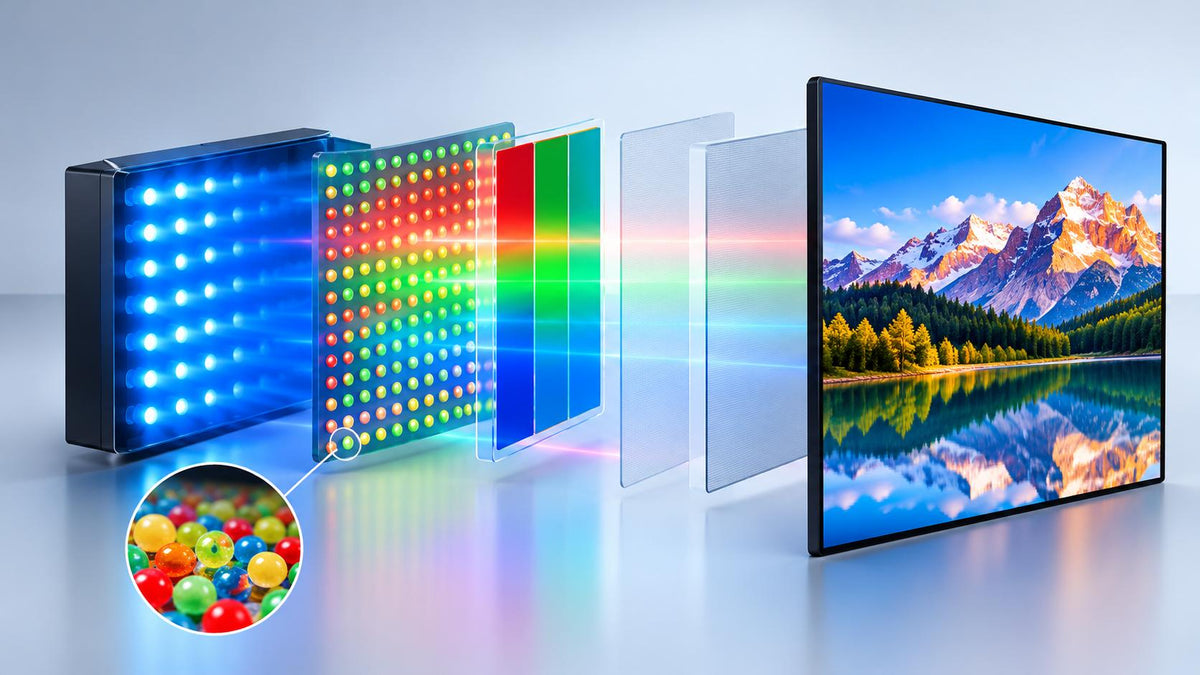
To understand how a QLED computer monitor works, it helps to look at three main components: the backlight, quantum dot materials, and LCD panel.
1. The Backlight Produces Light
A conventional LCD monitor uses a backlight to illuminate the screen. Many modern quantum dot LCD displays use blue LED light sources, although the exact design varies by manufacturer and model.
The spectral characteristics of this light influence the range of colors the display can reproduce. If the backlight produces light across a suitable range of wavelengths, the display can achieve more saturated colors.
2. Quantum Dot Materials Modify the Light Spectrum
In a quantum dot-enhanced display, specially engineered quantum dot materials convert some of the incoming light into more precisely defined wavelengths, typically contributing to red and green light.
These materials may be integrated into a dedicated quantum dot film or another optical component within the backlight assembly. The exact arrangement depends on the manufacturer's design, so not every QLED display uses the same physical structure.
By producing narrower spectral peaks, quantum dots can help the display generate more saturated primary colors and cover a larger color gamut. Samsung's technical discussion of quantum dot materials explains how their optical properties contribute to color reproduction.
3. The LCD Panel Forms the Image
After the light passes through the relevant optical components, the LCD panel controls how much light passes through each pixel. Color filters then help produce the red, green, and blue components needed to form the image.
The backlight system, liquid crystal panel, color filters, and image-processing electronics all contribute to the final display performance.
Quantum dots can improve the quality of the available light, but they do not determine every aspect of image quality. Resolution, contrast, brightness, color processing, and calibration still matter.
Does QLED Change the LCD Panel Structure?
Generally, no. In mainstream QLED monitors, quantum dot technology enhances the backlight system while the display continues to use an LCD panel.
For example, a monitor can combine an IPS panel with quantum dot-enhanced backlighting. These technologies describe different aspects of the display rather than competing panel categories.
IPS, or In-Plane Switching, is a type of liquid crystal panel technology. It influences characteristics such as viewing angles and liquid crystal behavior.
QLED, by comparison, usually describes the use of quantum dot materials to improve the light spectrum and color reproduction of an LCD display.
That means a monitor can be both IPS and QLED. The terms are not mutually exclusive.
However, an IPS panel does not automatically mean that a monitor uses quantum dots. Likewise, a wide color gamut alone cannot prove that quantum dot materials are present. To confirm the underlying technology, you need appropriate product specifications or technical documentation.
QLED vs. IPS vs. OLED: What Is the Difference?
QLED, IPS, and OLED are often compared as if they describe three equivalent display technologies. In reality, they refer to different aspects of display design.
|
Feature |
QLED LCD |
IPS LCD |
OLED |
|
Main technology |
LCD enhanced with quantum dot materials |
LCD panel technology |
Self-emissive display technology |
|
Backlight required |
Yes, in conventional QLED LCDs |
Yes |
No separate LCD backlight |
|
Quantum dots required |
Yes, for quantum dot-enhanced QLED |
No, not inherently |
Not required for conventional OLED; QD-OLED is a separate hybrid design |
|
Color gamut |
Can be wide, depending on design |
Varies by model and backlight |
Can be wide, depending on design |
|
Viewing angles |
Depend partly on the LCD panel used |
Generally a key strength of IPS |
Generally wide |
|
Black levels |
Depend on the backlight and dimming system |
Depend on the backlight and panel design |
Individual pixels can turn off |
|
Potential burn-in |
No typical OLED-style pixel burn-in |
No typical OLED-style pixel burn-in |
Possible under certain usage conditions |
The main takeaway is simple: QLED describes a quantum dot enhancement used in conventional LCD displays, while IPS describes a type of LCD panel. OLED uses a different light-emission approach.
QD-OLED is a separate hybrid design that combines quantum dots with OLED technology, so it should not be confused with conventional QLED LCDs. Samsung Display's explanation of QD-OLED technology provides more detail on this distinction.
Neither technology is automatically the best choice for every user. The right option depends on factors such as brightness, contrast, color requirements, intended use, and budget.
For a more detailed comparison, see QLED vs. OLED: Which Is Better?.
How Does QLED Improve Color Gamut?
Color gamut describes the range of colors a display can reproduce. A wider gamut means a monitor can represent a broader range of colors within a defined color space.
Common color spaces include sRGB, Adobe RGB, and DCI-P3. Each covers a different range of colors and serves different purposes.
Quantum dot materials can help expand a display's color gamut by producing more precisely defined wavelengths of light. Compared with a backlight system that has a less suitable spectral output, this can allow a display to reproduce more saturated reds and greens.
But a wider color gamut does not automatically mean greater color accuracy.
Color gamut measures the range of reproducible colors, while color accuracy describes how closely the displayed colors match their intended values. A monitor can cover a wide gamut but still need proper calibration to reproduce colors accurately.
It is also important to read gamut specifications carefully. A claim such as 100% sRGB usually refers to coverage of the sRGB color space, while a figure above 100% may refer to a different measurement, such as relative gamut area. These figures are not always directly comparable.
When evaluating a monitor, check which color space is specified, whether the figure represents coverage or area, and whether the result comes from a stated measurement method. The International Color Consortium's resources on display gamut provide further information about color gamut evaluation.
How Can You Verify a Monitor's Color Gamut?
Professional display measurements can help you determine whether a monitor's color performance aligns with its published specifications.
A display color analyzer can measure luminance and chromaticity under suitable conditions. With compatible software and an appropriate measurement workflow, the resulting data can be used to calculate color gamut.
For example, the Konica Minolta CA-310 Display Color Analyzer was designed for display measurements, including luminance and chromaticity. However, the CA-310 has been discontinued. Anyone selecting measurement equipment should check current product availability and support.
A typical evaluation involves the following steps:
- Allow the monitor to warm up and stabilize.
- Select the intended display mode and settings.
- Use suitable test patterns to measure the display's red, green, and blue primary colors, along with its white point.
- Record the measured chromaticity coordinates.
- Use an appropriate calculation method or compatible software to determine the gamut and compare it with the specified color space.
The testing environment, display settings, instrument configuration, and measurement procedure can all affect the results. For reliable comparisons, these conditions should be controlled and documented.
A color analyzer can help assess measurable color performance, but it cannot independently confirm the physical presence of quantum dot materials. Confirming the display's underlying technology requires appropriate component specifications or technical documentation.
In other words, instrument-based testing is useful for evaluating display performance, while product documentation is needed to verify the technology used inside the monitor.
What Should You Consider When Choosing a QLED Monitor?
QLED can be a useful feature if you want rich colors, but it should not be the only factor in your purchasing decision. Whether you're looking for a QLED PC monitor for work or entertainment, evaluate the complete set of specifications rather than relying on the QLED label alone.
Color Gamut and Accuracy
Check the stated sRGB, Adobe RGB, or DCI-P3 coverage according to your intended use.
If you work with photography, graphic design, or video, look for relevant color-accuracy specifications and consider whether calibration is supported. A wide color gamut is useful, but accurate color reproduction also depends on how the monitor is calibrated and configured.
Resolution and Screen Size
Resolution affects image detail and workspace. A 4K monitor has a native resolution of 3840 × 2160 pixels, providing four times as many pixels as a Full HD display with a resolution of 1920 × 1080.
A 4K QLED monitor can be useful for detailed images, video editing, multitasking, and high-resolution content. However, 4K resolution and QLED technology describe two different features. One refers to pixel resolution, while the other refers to quantum dot enhancement.
The terms QLED 4K monitor and 4K monitor QLED describe the same general combination: a 4K-resolution monitor that uses quantum dot-enhanced LCD technology. When comparing models, confirm both the native resolution and the actual display technology rather than assuming that a product title alone establishes its specifications.
Brightness and Contrast
A higher brightness level can improve visibility in bright environments, although actual performance also depends on reflections and screen coating.
Because conventional QLED monitors still use LCD panels and backlights, black levels depend on the panel, backlight design, and any local-dimming capabilities. Quantum dot technology can improve color performance, but it does not automatically guarantee stronger contrast or deeper blacks.
Panel Type and Refresh Rate
Determine whether the monitor uses IPS or another LCD panel technology, as this can affect viewing angles and other characteristics.
For gaming and fast-moving content, refresh rate and response time may be just as important as color performance. A high-refresh-rate monitor can provide smoother motion, while response time influences how quickly pixels transition between colors.
Consider how you plan to use the monitor before deciding which specifications matter most.
Comparing the Best Options
When researching the best QLED monitors, compare the complete specification sheet, including color gamut, resolution, brightness, contrast, refresh rate, connectivity, and calibration options.
A QLED label alone does not guarantee identical results across different products. Two monitors can both use quantum dot technology yet deliver different performance because their backlights, panels, image processing, and factory calibration are not the same.
For example, if you're looking for a 4K QLED monitor, consider not only the pixel count but also the monitor's color performance, brightness, connectivity, and intended use.
Final Thoughts
QLED technology enhances conventional LCD displays by using quantum dot materials to improve the spectral characteristics of the backlight. This can support a wider color gamut and more saturated colors without requiring a fundamentally different liquid crystal panel structure.
Understanding the difference between quantum dot technology, LCD panel types, and measurable color performance makes it easier to interpret monitor specifications.
Whether you're comparing a QLED monitor for everyday use, a QLED computer monitor for productivity, or a high-resolution display for creative work, looking at the full set of technical characteristics will give you a more reliable basis for choosing the right screen.
Share:
Why Can't a Monitor Reach Its Advertised Brightness or Color Performance?