

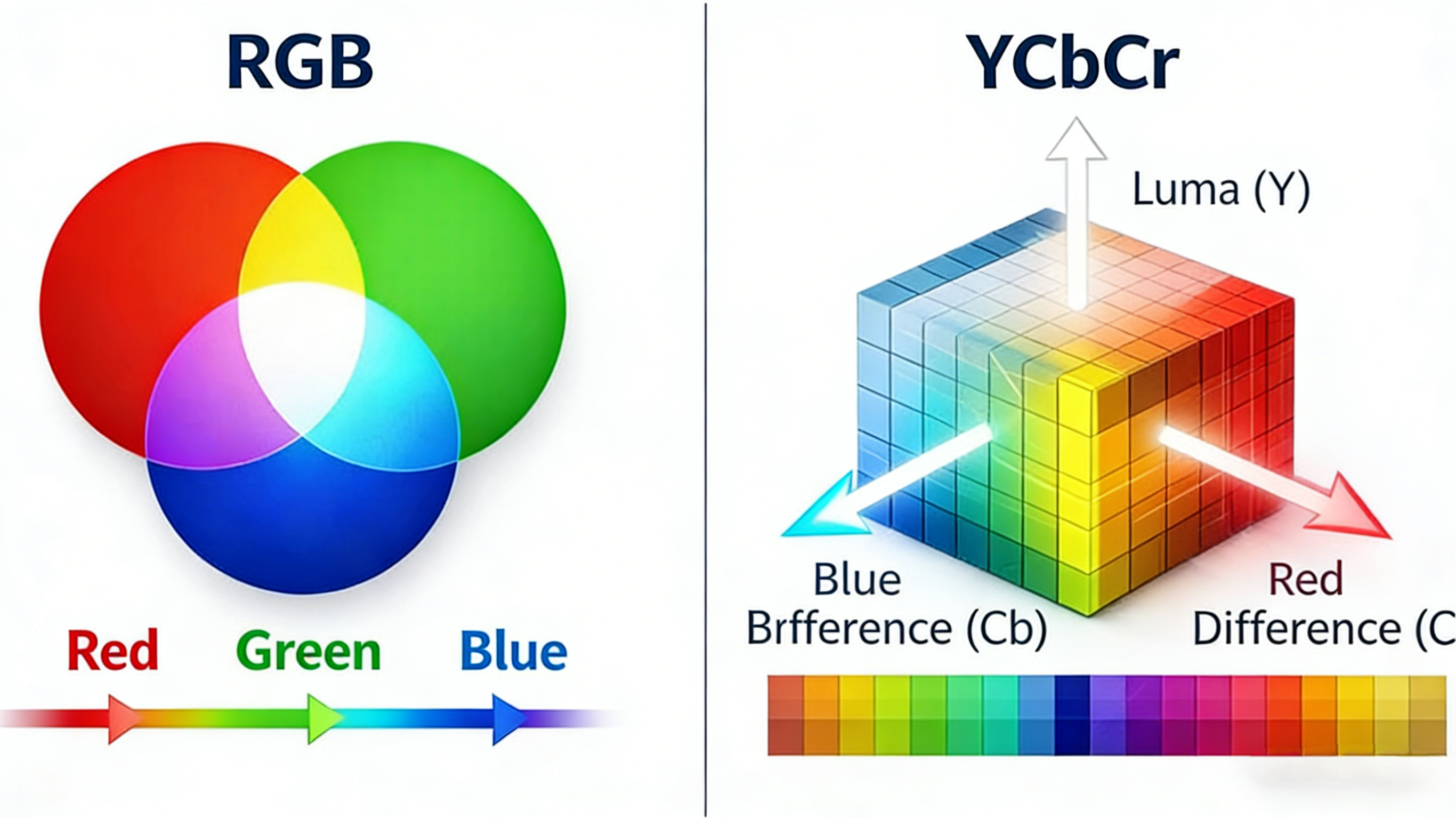
Sometimes, the same monitor can display inconsistent color accuracy, which often leads to blurred or less visible visuals. This is usually a result of mismatched color format and range settings in the system.
Whenever image frames originating from signal range configuration are transmitted, they are usually transformed between color models before being reconverted for processing. Certain color metrics play a big role in how the display signal is being sent. Any small misalignment in these metrics is enough to reduce HDR qualities and output detail.
While modern monitors are capable of displaying high-quality imagery, disrupted color settings often produce output with crushed blacks, faded whites, and so many dull colors. This is the major factor that affects the capacity of high-quality HDR monitors, turning a great screen into a disappointing one.
How Digital Display Color Formats Work?
When a monitor is receiving image frames from a source device, there are a lot of complex concepts behind this transmission. After connecting a system to the monitor, the system has to undergo a process where color information is packaged before transmission. This whole concept determines how the final image frames will appear.
How Color Data Is Transmitted From GPU To Display
Every video and image frame you see on a visual system is a product of your source device where color information is processed for output. Before the data is displayed on the monitor, they are transmitted through a display interface, usually DisplayPort or USB-C, each of which supports a particular color and range settings.
However, the generated signal passes through a chain of key decisions, where color format and range are made. These key decisions are made by the GPU (Graphics Processing Unit), where color models (such as RGB and YCbCr) are fully encoded. Meanwhile, this process is automatic and happens within microseconds per frame, depending on the refresh rate.
Once the processed data gets to the monitor, it applies its own processing based on how it interprets the signal. If the color format released by the GPU mismatches the expected input on the display, the output will appear overly dark, with colors washed around each frame.
What Is RGB?
This is the most common color model used to package color data by systems and visual displays. It simply represents the primary color for light-based technology: Red, Green, and Blue. Being the foundational color formats, they are used to produce millions of other colors.

Image credit: iStock
How RGB Represents Color
In the RGB model, every image frame is made of red, green, and blue sub-pixel. When these three colour formats are adjusted at full intensity, they are able to generate white sub-pixel. On the other hand, they can be used to generate black sub-pixel when they are completely turned off. Most importantly, different combinations and shades of the primary colors can be made based on the adjustment of the intensity across each of these channels.
However, this color model is widely used by PC monitors to get a precise color control. Since modern monitors are needed for computing tasks and high-graphics displays in gaming, RGB is well-suited because it directly matches how displays produce light.
RGB Full Range vs RGB Limited Range?
RGB signals are usually transmitted in two intensity ranges: the full range and the limited range. This intensity range is an interpretation of how much white and black levels can be attained.
The full range (0 – 255) offers the maximum level of peak brightness available in the color format. This RGB range is usually used by gaming PCs where the lowest level displays ultimate black and the highest level corresponds to purest white.
Limited Range (16 – 235) offers a different level of color spectrum seen in broadcast TVs and streaming services. They offer a different level of black and white signals, where 16 is the lowest value for dark levels and 235 is the maximum level for peak brightness.
At this point, if a system transmits limited range signal to a display expecting full range signal, there will certainly be a mismatch where the image quality suffers. In cases like this, the image tends to appear washed out as the deep blacks fade into gray and the white colors lose their peak brightness.
Similarly, if a system transmits full range signal to a display expecting limited range signal, the image frame will always appear darker, casting unnecessary shadows in each image frame. Hence, matching your system and visual display is paramount for a high-quality viewing experience.

Image credit: Freepik

What Is YCbCr?
This is another color model commonly used in TVs and streaming services. Unlike the RGB model that relies on the primary colors for display, YCbCr helps separate the visual data into two parts: luminance and chrominance. This process is usually more effective when transmitting video signals.
How YCbCr Separates Luminance And Chrominance
In YCbCr, the Y is associated with peak brightness, black level, and everything that has to do with luminance. However, the Cb and Cr model transmits color information, essentially defining the degree of many other colors when displayed at the same time.
Since it is easy for the human vision to pick slight changes in brightness, it easily favours the YCbCr model. On the other end of things, RGB is preferred for text clarity since YCbCr has less precise color production.
Why YCbCr Is Common in Video and HDMI Output
Many video standards require some form of lossless compression to preserve the quality of the video over limited bandwidth. This is the reason they are designed with YCbCr in mind. The color model aligns with how much brightness and color consistency is needed to meet up with the needs of modern TVs and HDMI-based equipment.
RGB vs YCbCr: Key Technical Differences
Basically, the major differences between RGB and YCbCr models are connected to how much color data is being transmitted. Even though they might look similar, here are some features to consider.
Color Accuracy And Sharpness Comparison
RGB is generally considered a color-oriented model that preserves color quality for every image frame generated from the source device. This model is very useful for monitors displaying large amounts of texts and elements where image clarity is very important.
However, YCbCr offers quite a good amount of color clarity, that is sufficient for movie display and broadcasting. Since they offer some form of lossless compression, the pixel colors undergo minor smoothing.
Bandwidth and Signal Compatibility
When a video is being transmitted at a high resolution, they require more bandwidth to handle this transmission. Many interface standards cannot fully support output from the RGB model as it requires a lot to handle the consistent image quality required. Hence, the need for lossless compression. To function within the bandwidth limits, the system has to transform video data from RGB model to YCbCr.
Meanwhile, the display interface is responsible for major compatibility rules involving color models on both ends of the transmission. Factors involving low-quality cable and very limited bandwidth can negatively influence the transmission of video signals.
What Does “RGB to YCbCr” Mean?
RGB to YCbCr is a process that involves the conversion of video data from RGB model to YCbCr for lossless color compression before transmitting to the visual system. It is important to note that this transmission has little to do about the content, but more to do about the color format and packaging.
When And Why RGB Is Converted To YCbCr
In modern displays, the transmission of video data from RGB to YCbCr is usually influenced by GPUs. Whenever there is a notable bandwidth limit, the GPU automatically switches the video data without any user influence. This is why YCbCr is a more suitable model for transmitting color formats at extremely high resolutions and refresh rates.
RGB to YCbCr Model Transformation and Chroma Subsampling
When video data is converted to YCbCr, it undergoes a process known as chroma sampling. This process involves a lossless compression of the color package while keeping full brightness detail. Here are three color values used to represent chroma sampling; 4:4:4, 4:2:2, and 4:2:0.
4:4:4 means there is no chroma sampling. Here, the color and peak brightness is 100% retained for every image frame. 4:2:2 represents reduced color resolution, where the color quality of adjacent image frames is halved, while preserving the peak brightness across each pixels. 4:2:0 works like 4:2:2, except that it reduces the color quality horizontally and vertically, while still preserving the peak brightness. Here, video texts and subtitles may appear faint.
Common Scenarios Where Model Conversion Of RGB to YCbCr Causes Issues
There are times when a PC monitor displays video data in the YCbCr model. This happens when the source device identifies the visual system as a TV instead of a PC. In the long run, the visuals will appear frustrating with blurred texts and peak brightness.
Difference Between Full Range And Limited Range
The levels of black and white display of RGB signals on every monitor is a product of the intensity range. Any misinterpretation by the source device can affect the quality of display. If full range is misinterpreted as limited range, then the black levels will appear grayish on every frame. Also, if limited range is misinterpreted as full range, the peak brightness will appear dull on every pixel.
Which Should You Use: RGB or YCbCr?
No matter the purpose for displays, RGB is most certainly always the best choice. For office work, graphics design, and other text-heavy jobs, the need for clear text always takes precedence over brightness. Unlike YCbCr, the RGB model transmits the original color across image frames. However, YCbCr is adequate for video display on TV and streaming services, where high quality text display is not important.
Best Choice for TV And Other Media Devices
Due to its ability to transmit video data within the bandwidth limit, YCbCr is the best choice available. This model rarely experiences mismatches, and virtually every media device is designed for easy compatibility with YCbCr signals.
Even though they are optimized for TV display, they possess some practical tradeoffs;
- Texts and thin image details may appear less visible.
- Chroma sampling will reduce color quality
- The lossless compression only exists for peak brightness.
How to Check and Change RGB / YCbCr and Range Settings
While color models are usually selected automatically, modern GPUs allow users to control output range. The need to maintain the transmission of high-resolution video can force signals to stay within the bandwidth limit.
On Monitors and Display OSD Menus
With the advancement of display systems, modern monitors allow users to adjust color range settings through a menu. This can be used to correct mismatches and default settings made by the GPU. Here are three options on how to go about that;
Auto: In this mode, the monitor has autonomy to select and adjust range based on the received video signal.
Full: This mode forces the visual system to use the default 0 – 255 RGB range, which can, sometimes, result in a mismatch.
Limited: This mode readjusts the range to 16 – 235, to ensure compatibility with YCbCr signals.
The OSD menu can help change these settings to improve color quality and control GPU selections.

Image credit: ViewSonic User Guide
Conclusion
Ultimately, every user has the ability to control the color quality of their visual systems. By applying knowledge of GPU and display interface, you can easily select the correct format and range to unlock the best visual experience.
FAQ
Is RGB Better Than YCbCr for Monitors?
Yes, RGB is significantly better as it offers high-quality color behavior while maintaining the peak brightness.
When Should You Use YCbCr Instead of RGB?
YCbCr is easily maximized for TVs and streaming services.
Which Color Model Is Better for Texts?
Due to chroma sampling, the YCbCr model remains inferior to RGB. On the other hand, color output is better on RGB models because they transmit the original image quality.
Which YCbCr Format Is Best: 4:4:4, 4:2:2, or 4:2:0?
4:4:4 is a color value that preserves the full color quality for each image frame in the YCbCr model. When compared to 4:2:2 and 4:2:0, they offer the best overall quality because they don’t undergo chroma sampling.
What Does YCbCr 4:4:4 Mean in Real-World Use?
YCbCr 4:4:4 maintains full color resolution without subsampling, so text, UI elements, and fine details appear crisp.
Why Does YCbCr Sometimes Look Worse Than RGB on Monitors?
Since YCbCr may use chroma subsampling or limited range, which softens edges and reduces contrast, making text and UI elements appear less sharp.
Is YCbCr Mainly Designed for Video Rather Than PC Displays?
Yes, YCbCr is optimized for movies, streaming, and broadcast content, where human vision is more sensitive to brightness than color detail. RGB is better for pixel-precise desktop applications.
Why Do Some Displays Default to YCbCr Instead of RGB?
Many displays, especially TVs, identify themselves as video devices over HDMI. GPUs often automatically switch to YCbCr for compatibility or bandwidth reasons.
Should YCbCr Be Turned On or Off for External Monitors?
For PC monitors, turn it off and use RGB Full Range for accurate colors, sharp text, and UI clarity. For TVs or media-focused devices, YCbCr is appropriate and ensures proper video playback.
Share:
What Is DisplayPort EDID And How Does It Affect Display Output
How DisplayPort Alt Mode Actually Works Over USB-C?