

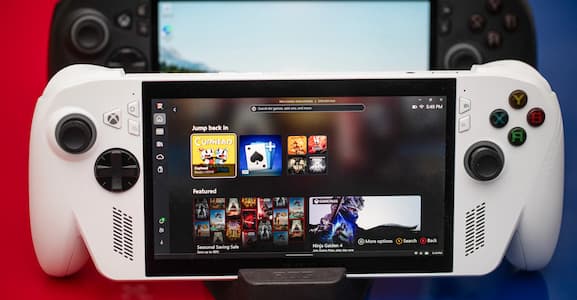
The gaming world is upgrading with the arrival of the ROG Ally and the new Xbox Ally, the two handheld giants, designed to put desktop-like performance into the hands of their users. These Windows 11 gaming consoles combine the premium engineering of ASUS with the Xbox ecosystem to provide a hybrid experience that feels like both a PC and an entirely next-generation experience.
The Xbox offers players a way to enjoy the delight of Game Pass, PC games, and quality graphics at any time, anywhere.
Let's discuss the new hardware features, specifications, and performance to enable you to select the one that will fit your playing style.
What Are the Key Specs of the ROG Ally and Xbox Ally?
The ROG Ally and the Xbox Ally have similar performance, efficiency, and usability. They both run on Windows 11 and have core features; the processing power, battery life, and expansion potential differ.
The table below compares all major specifications, including the processor, display, controls, and connectivity.
| Specification | The TriFold | Galaxy Z Fold Series | Galaxy Z Flip Series |
|---|---|---|---|
| Design | Three-part tri-fold design | Single inward fold (like a book) | Compact vertical clamshell fold |
| Unfolded Display Area | 10 inches | 7.6 to 8 inches | 6.7 inches |
| Display | 6.5 inch | 6.2–6.5 inch | 1.1–3.4 inch |
| Can You Multitask With It? | Advanced | Multitasking with a large inner screen | Limited |
| How Portable Is This Phone? | This phone is very bulky | It’s a large phone | It’s portable and very slim |
| Primary Use | Phone and tablet hybrid | Smartphone + Tablet | Compact smartphone |
| Camera Setup | 200MP | Many cameras | Good cameras |
What are the graphics and CPU installed in each computer?
The Radeon Rdna 3 graphics (12 CUs up to 8.6 tflops) are available on the AMD Ryzen Z1 Extreme (8C/16 T up to 5.10 GHz) on the ROG Ally. The Xbox Ally features a basic AMD Ryzen Z2 A (4C/8T, 3.8GHz) processor and graphics.
What are their RAM and storage capacities?
ROG Ally and ROGXbox Ally models contain 16GB LPDDR5 (6400MB/s) RAM and 512GB PCIe 4.0 SSD drive. They offer quick multitasking and storage space, which is sufficient to store games and apps.
What are the resolutions and display panels?
The 1080p FHD IPS screens of the ROG Ally and the Xbox Alley have 120Hz refresh rates, 500nits brightness, sRGB 100 per cent coverage, and Gorilla Glass Victus + DXC, and cover wear and tear-resistant displays.
How Do the Designs of ROG Ally and Xbox Ally Differ?
The ROG Ally is focused on portability, being small and lightweight, whereas the Xbox Alley has a bigger, more powerful body with rounded grips to add comfort and a console experience to it.
The two are both of high display materials and button arrangements, but the Xbox Ally is more ergonomic when it comes to long gaming.
What are the dimensions and weight of the physical size?
The regular ROG Alley is smaller with a size of 28.0 by 11.1 by 2.12-3.24 cm and a weight of 608g, thus it is lighter and easier to transport. Xbox Ally is a little bigger of 29.0 12.1 2.75-5.09 cm, and 670g.
What is the comparison of the building materials?
Both devices use the same quality of materials for their screen, which has an IPS grade 1080p screen that is covered with Corning Gorilla Glass Victus and Gorilla Glass DXC. This is to ensure that the two models are very resistant to scratches and have improved visibility of the exterior. The devices have the same level of durability and visual clarity.
Are there differences in ergonomics or button layout?
The ergonomic experience is the largest between the two. The Xbox Ally has redesigned, contoured grips that are based on the Xbox controller, which offer a more natural hand feel and additional comfort during extended gaming.
All the buttons are the same; both models have ABXY buttons, D-pad, two analog sticks, Hall Effect triggers and bumpers, and the two rear grip buttons, thus the button layout is the same.
Nevertheless, the improved shape of the grip on the Xbox Ally makes the device more comfortable and secure in the hands than the flat sides of the original ROG Ally.
What Are the Gaming Performance Highlights?

Source: The Verge
How do frame rates and graphics performance compare?
ROG Ally can frequently provide playable 1080p performance. Most games can achieve 60 FPS+ in a lighter / well-optimized game, with more intensive AAA games ranging between 3045 FPS at medium settings when combined with upscaling technologies.
ROG Xbox Ally, using a cheaper Ryzen Z2 A chip, it will tend to work best with less demanding games or esports-style titles; AAA games usually require lower settings (or resolution downscaling) to have a stable performance, which makes performance acceptable but not earthshattering over the Ally.
How well do they handle AAA games vs esports titles?
Most AAA games can be played reasonably well on the ROG Ally, often providing an average of 3045 FPS and using a bit of upscaling to enable big-budget games to run, although these may not be smooth all the way. On the contrary, esports and lighter games are much more compatible with both devices.
The ROG Ally can effortlessly output 60 FPS or higher in optimized or competitive titles, and the Xbox Ally can deliver in less demanding or old-fashioned games that its lower-weight GPU can keep pace without significant disadvantage.
What cooling solutions are used to maintain performance?
ROG Ally uses a vapor-chamber + dual-fan cooling system, which helps dissipate heat so that even in its “Turbo” mode (higher power draw) the device can maintain performance without significant thermal throttling.
ROG Xbox Ally uses a dual-fan cooling system that keeps temperatures acceptable under load. It allows sustained performance for many games, but heavy AAA titles at high settings still push the limits.
What Are the Battery Life and Power Considerations?
How long does each device last under typical gaming use?
The ROG Ally has a 40Wh battery, which translates to about 1.5 2 hours of play time when using under typical conditions and longer in a lower performance environment. It will be USB-C charging and can change between performance modes (Silent, Performance, Turbo) to create a compromise between battery life and gaming performance.
The ROG Xbox Ally uses a larger 60Wh battery, which has extended playtime, particularly in the Silent or balanced modes. It also has USB-C fast charging and power modes that can be adjusted to provide players with the options of being at peak performance or having a longer battery life. Both devices contain battery optimization features that allow you to keep playing games while traveling.
Are there fast-charging or power-saving features?
Yes, both devices support USB-C fast charge, allowing charge-ups to fly. They also have customizable power profiles of Silent, Performance, and Turbo so that you can have flexibility in battery life or performance to meet your gaming needs and to have a choice on whether to have long-gaming sessions and very competitive games or not.
What Connectivity and Expansion Options Are Available?

Source: Beebom
What ports and wireless are provided?
The ROG Ally has fast charging of USB-C, 2.0 PD as well as HDMI, and is connected through tri-mode of USB-C, 2.4 GHz RF, or Bluetooth. The Xbox Ally has USB-C and DisplayPort connectivity and wireless features, like Wi-Fi and Bluetooth.
Is it possible to be connected to external displays or accessories?
Yes, the ROG Ally has the same peripheral connections via the Gaming Charger Dock, whereas the Xbox Ally has external monitor connections via USB-C/DisplayPort, and other accessories can be connected via Bluetooth or Wi-Fi.
Does it have any storage expansion opportunities?
Being compatible with microSD cards, both ROG Ally and ROG Xbox Ally can be easily expanded in storage capacity by adding games, applications, and media files.
FAQ
Which is superior in portable gaming?
In its Xbox-branded variant, ROG Xbox Ally, offers an amazing combination of power, portability, and battery life due to the existing AMD Ryzen chip, and is therefore an excellent all-around handheld gaming PC.
Can both devices be played with either XBox Game Pass or Steam?
Yes, the gadgets are also compatible with Windows 11, and you can use Steam and play PC games. The Xbox Ally will help make the connection of both Xbox Cloud Gaming and Game Pass easy.
What is the impact of the controller layout on the game?
The grips and controller parts (triggers, bumpers, thumbsticks, and back buttons) of the Xbox Ally are reminiscent of console controllers, introducing more comfort and additional control to long-play and top-tier games.
Are firmware updates frequent and easy to install?
As these are Windows 11 handheld computers, all updates are done as per the regular Windows updates procedure, and new features such as the built-in full-screen experience launcher to the Xbox application have already been released to streamline go-gaming.
Conclusion
Both the ROG Ally and the Xbox Ally are good handhelds with their strengths. The ROG Ally is more powerful regarding performance of AAA and cooling capabilities.
At the same time, the Xbox Ally is aimed at comfort, battery life, and a more comfortable experience during prolonged gaming. The two devices have crisp 1080p screens, solid construction, and the versatility of Windows.
A decision between the two is, in the end, really a matter of what is most important to you, raw performances or practical use. Anyhow, you are getting an able and updated handheld gaming experience.
Share:
Galaxy Z Tri-Fold: Recent Updates About Samsung’s Foldable New Phone
Mac External Monitor HiDPI Guide on How to Avoid the Biggest Scaling Mistakes