

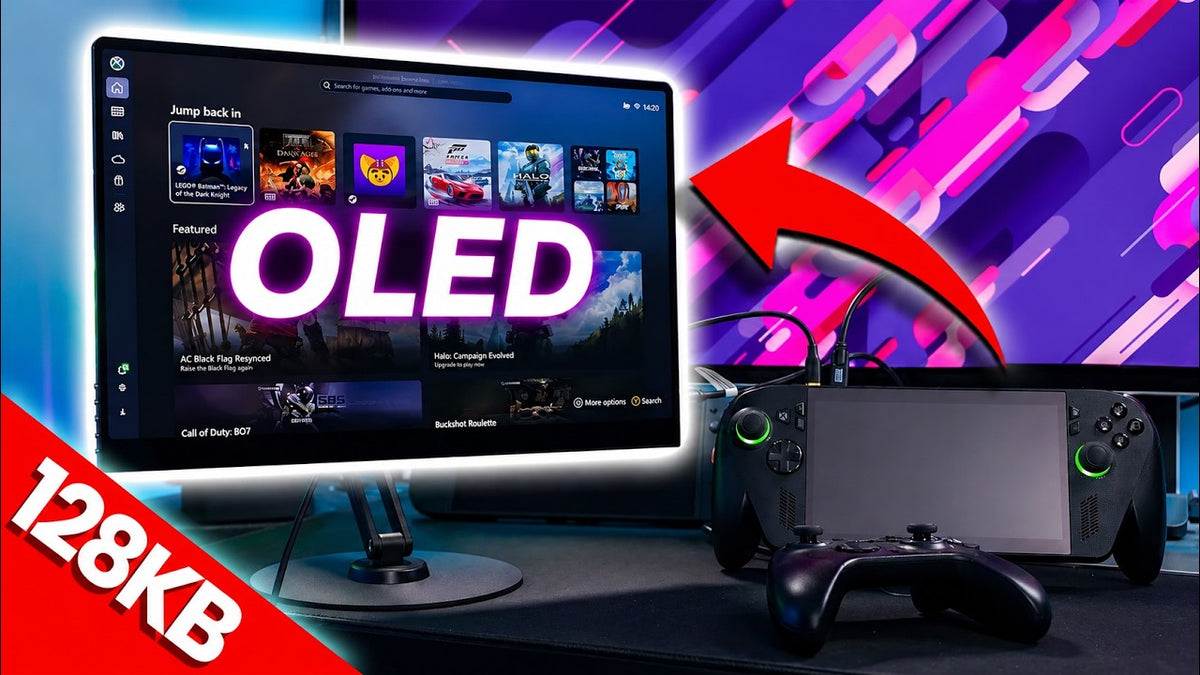
Handheld prices are through the roof right now, and maybe your LCD one is not cutting the mustard, maybe you're lusting after an OLED one, but what if I told you could turn your LCD handheld into an OLED experience? We're checking out the UPERFECT GR16HQ OLED portable monitor, and yes, this video is sponsored by UPERFECT, but. I am going to draw some criticisms here and they don't get to see the video before I release it.
And also we agreed to this because we think it's a really good solution to LCD handheld users that wanna upgrade their experience without having to like dump almost double the amount of cost. Now we're focusing on the Xbox Alli X here today, and if you currently already own one, there's not a compelling enough reason to drop potentially like twice the cost again for the same. handheld, but this time with an OLED screen when the X20 releases.
Monitor Options

14-Inch vs 16-Inch
So instead, you could spend either $330 that's all this one costs, for the 14 inch version of this monitor, which honestly I think is really good value. Or you can drop $500 for the Big Boy 16 inch version that we're looking at today, and yes, it does support automatic super resolution ASR on the NPU of the Xbox AI X.
It's also super easy to set up with an Xbox Alli X as well. Oh, and yes, this is a super glossy OLED screen for all of you OLED aficionados, right, so you're gonna get really good contrast and really good color.
Display Specifications
So let me run down the specs for you, this is the UPERFECT GR16HQ OLED. We've got a 16 inch, 16 by 10, whoop whoop, 120 Hz 3K monitor, which is 2880 by 1800. Now, this is what they show on the website, but from what I've tested it's a little bit different, OK, so I'll tell you.
It says that it supports 3K75 Hz. 2K at 120 Hz via the HDMI, but they don't say anything about the USB-C spec. Now this is how I've used it, I'll talk about setup and how I've done it later, but I tested the USB-C and it supports the full 3K resolution at the full 120 hertz.
So I feel like they've done themselves over a little bit on their spec sheet. It might be that the HDMI only supports up to 7. 5 Hz via the HDMI, but using USB Direct in, it supports the full resolution at the full refresh rate.
It's got a 1 millisecond response time, of course it is OLED. We've got a 100% DCIP3. It does have HDR, it's got built-in speakers, more on those later.
It's got two USB-C ports, a mini HDMI port. It's got free worldwide. Wide delivery, which I think's actually really good, causes a lot of these times if we do take a sponsor for the channel, you know, we'll, we'll rave about it, but then someone in a specific country will be like, hang on, it's like a million pounds for shipping or whatever, right?
This on the website says free worldwide delivery, which I think's really good. You also get a 2 year warranty and a 60 day risk free trial.
What's Inside the Box & The Stand

What's in the Box
Now inside the box we get the monitor itself with a folding kick stand case that can just be removed, it's just magnetized, right, it's one of those like foldy casey things. We get a mini HDMI to mini HDMI adapter, so basically it hides the cable behind the screen when it's plugged in if you're gonna use that.
We get some M4, 4 millimeter screws for the vase mount on the back. Yes, this thing has a vase amount, I'm so happy about that. We get a 30 watt charger and I was surprised to see it was.
Regionally accurate as well, so we actually got a UK plug here. Often when we do videos like this, I end up with like an American plug and I have to put like adapters or change the plug, it's really annoying.
But I actually got a UK plug here, wicked, and it's a USB-C 2, more on that later. Now we get a mini HDMI to HDMI, so full size to mini, so you can plug in a console or a laptop or a MacBook, whatever you wanna do, it's pretty cool.
Then we get a. USBC to USBC, USB 3.1 gen 2, which is data, you know, and power, right? And then you've finally got another USB-C to USB-C.
This one is full power only to be used with the charger that came inside the box. Oh, and it weighs 0.72 kg or 1.59 pounds.
Folding Kickstand Case

Now the folding kit stand case thing is OK, but I don't like these portfolio things myself. But I mean it is a portable monitor, so it's gonna protect the screen, which is really good, but I, I'm just not a big fan of these, so yeah, it's alright if you're actually taking it out and about, but for me, I'd want something a bit more substantial.
And luckily UPERFECT make an awesome Vesa arm attachment which is magnetically attached via a metal plate or like a, a, a metal sticky pad. Now, having a Vesa mount on the screen itself is awesome, you can just use any attachment you want then, but.
This stand, legit, is really good. It's got like a swivel base so you can angle it at different angles and stuff, and the two different attachment types, and I love the fact that it's just magnetized on there, so you can just pop the screen off and chuck it in your bag again, like it's so good, I hate having to like do all the screws and stuff.
VESA Mount & Magnetic Stand

Now there's two attachment methods, you can just stick the sticky back thing on the back of the monitor and then it will just magnetize to that. But for me, I wanted a bit more security, so I used the.
Mounting bracket that it came with, however, the stand itself comes with a bunch of different screws because they don't know what screen you're gonna attach to it right, and even the ones that were the right size for this monitor felt a bit loose, so that that metal plate that the stand would attach to was a little bit loose.
But luckily with the screen, it came with the right screws, so I used the screws from the actual screen itself instead of from the, the, the kick stand pack thing, right? And this locked that plate onto the Vesa mount perfectly, tightly as well with no movement, so that then I was confident I could use this without the monitor like slipping around, which was really cool, and that magnet is super strong, it really, really is, so I've got no worries about using this stand, and it's wicked, I really like the kick stand thing here.
Gaming Setup, Performance & Verdict

Connecting the Xbox Alli X
Now despite the fact that the monitor comes with. Loads of different connection methods because don't forget this is just a monitor, you can plug it into anything you want. We are just focusing on handheld gaming here today cause that's kind of what we do on the channel.
We can bypass a lot of these connection methods with the Xbox Alli X if you already have a 100 watt charger. So, I used a 100 watt charger plugged into my Xbox Alli.
X then used the included USB-C 3.1 gen 2 cable to connect the Xbox Alli X to the monitor. Now this way, the 100-watt charger powers both the Xbox Alli X and the screen at the same time, and also lets you use the full 35-watt TDP mode on the Xbox Alli X for maximum performance.
And also using the USB-C cable gives you a maximum resolution of 2880 by 1800, the 3K resolution, they mark it right, with the full 120 Hz refresh rate option.
Monitor Controls & Brightness

Now on the left-hand side we've got five buttons, we've got power, menu, up and down or input, and if you're not in the menu, then you can adjust stuff like volume or brightness just on the fly there, but you can go into the menu for more stuff, and there's decent options there like brightness, contrast, picture profiles, DCR, sharpness, HDR. Aspect ratio, volume, and, and more.
The brightness is actually really good as well, despite only being 500 knits. I actually thought it was a lot brighter than that, and I settled on 50% brightness.
So I was expecting to just have to max it out, but that wasn't the case at all. Oh, and bear in mind as well, I'm not filming any of this in HDR so I've turned HDR off for all the clips and B-roll that you'll be seeing on the video, right? But in person, the HDR actually looks really good.
ASR & 16:10 Gaming
Now you can just use the Xbox Alli X. Inbuilt controller to play, but I actually chose to use an external controller just cos I thought it'd be a bit easier.
But just remember, if you want to use ASR on the Xbox Alli X specifically, you will need to set your in-game resolution a lot lower. So, I actually set mine to around 800p and then let ASR upscale it, because this then let it use the full 16 by 10 aspect ratios that this OLED screen supports, and I absolutely love that it's 16 by 10.
I know some people are like 16 By 9 only, but I am all 16 by 10 , Like 16 by 10 is the best aspect ratio, you know, you're wrong if you think otherwise, let me know down in the comments if you prefer 16 by 9 or 16 by 10.
For me, for gaming, 16 by 10 is just the best because you just get more vertical, like viewing area, right? Go look at the Odyssey, the new movie, movie, you know, the Christopher Nolan movie.
Look at that 70 millimeter of like size compared to like a 16 by 9. It's kind of what you're getting here by going from 16 by 9 to 16 by 10.
OLED Gaming Experience
So. Let's talk about gaming, and honestly it is incredible. OLEDs to me are just make your gaming look next generation, and until you experience it, you really don't know what you're missing.
It's literally the easiest way to level up your gaming experience and the UPERFECT doesn't disappoint at all. Games like Cyberpunk just absolutely pop here and don't forget I have got HDR off as well, even though it almost looks like it's on in the video, right?
It just looks so damn good, better than any. LCD could ever dream of. And the same goes for games like Ratchet and Clank.
These games just scream to be played on OLED because the crazy amount of contrast in the game, bright colors and neon lights and all this kind of stuff, it just really changes the experience when you play it on an OLED.
Now more neutral games also look really good as well, so I was playing Forza here and it just looks fantastic. And of course, that 120 hertz screen is just super-fast too, and using ASR makes the up.
Scaled lower bass resolution look absolutely fantastic whilst keeping decent frame rates at the same time.
The Two Main Problems
But despite their UPERFECT name, it's not all perfect. There are two things here that are lacking, and I'll let you decide if that's a deal breaker for you.
Now the first is the inbuilt speakers, which are located on the back of the monitor, they're, they're just super quiet and really tinny. I mean, I'm glad that they're speakers for like notification sounds if you were using the, the screen for like working or something.
Maybe, but they leave a lot to be desired, and honestly, I just wouldn't use them at all. Instead, I set my audio output to be the inbuilt speakers of the Xbox Alli X because these are excellent speakers.
They absolutely destroy the monitor's speakers in both volume and overall quality. But of course, you could just, you know, use headphones connected to your device or whatever for an even better experience again.
No VRR or FreeSync

Now the next thing that is missing is kind of a big one, and if it had it, it would be a hand down, everyone go buy it like right now. But this might be a deal breaker for you.
There is no VRR support at all, there's no free sync support, which means basically you need to cap your game's frame rate for a locked experience at 30 FPS or 60 FPS for example, or you need to enable VSync because you want to eliminate screen tearing.
If you don't cap your frame rate, if you don't enable VSync, you will get screen tearing. But there's ways around it, by capping your frame rate.
Or using VSync and then you won't get screen tearing. Now for me personally, VRR would have been an absolutely huge win, but it is a premium feature and I expect it would have driven up the cost considerably.
So I mean, I can kind of overlook these features. These are expensive screens, but they're also really well priced.
So, I think not having VRR is just a sacrifice they've made to keep them affordable. And honestly, if you just cap your frame rate or use VSync, like it's OK.
Final Value & Pricing
So overall. Overall, the gaming experience here is absolutely fantastic, and yes, they're not exactly cheap with the 16 inches, you know, coming in at about $500 which is actually down from $730 currently.
And the 14 inch being $330 down from $500. But for example, that $330 for a 14-inch version here, you're getting all the same specs, it's just a little bit dimmer.
$330 for an OLED portable monitor as good as this, and as well. Constructed as this, that's actually a steal, and that's gonna cost you a lot less than buying a whole new handheld that has an OLED screen right now.
I mean, look at the Legion Go 2. Like this thing went from being like $1000 to like nearly $3000 like, it's insane. So, if you've already got a handheld, this is actually a really good idea.
Stand & Protective Sleeve

Now for me, the stand is kind of a must-have because I've experienced it and it is just so good having that magnetic attachment there, but that comes in as an extra. $90 that's quite a lot for a stand, but of course you could just use the, the built-in one on the like foldable thing, or maybe you've got other stands that you could use.
And if you wanna protect it out and about whilst you're traveling, if you're gonna actually use this as a real portable screen, then you probably wanna buy the protective sleeve, which comes in at another $39. So, it's not all cheap, but it's by far a really good way of upgrading your gaming experience on an LCD handheld, for example.
At a lot less of a price and cost to you than buying a whole new handheld.
Final Thoughts

Anyway, let me know your thoughts down in the screen. Would you buy one of these? Have you already got one? I wanna know your experiences. I think it's really good. I really do think it's good, I genuinely mean that. I'm gonna keep using this thing because it's, it's really good.
Share:
UPERFECT GR14BU Portable OLED Gaming Monitor Reviewed by Joseph K Morris
UPERFECT BE22BQ 22 Inch Portable Monitor Reviewed by AyLabs