

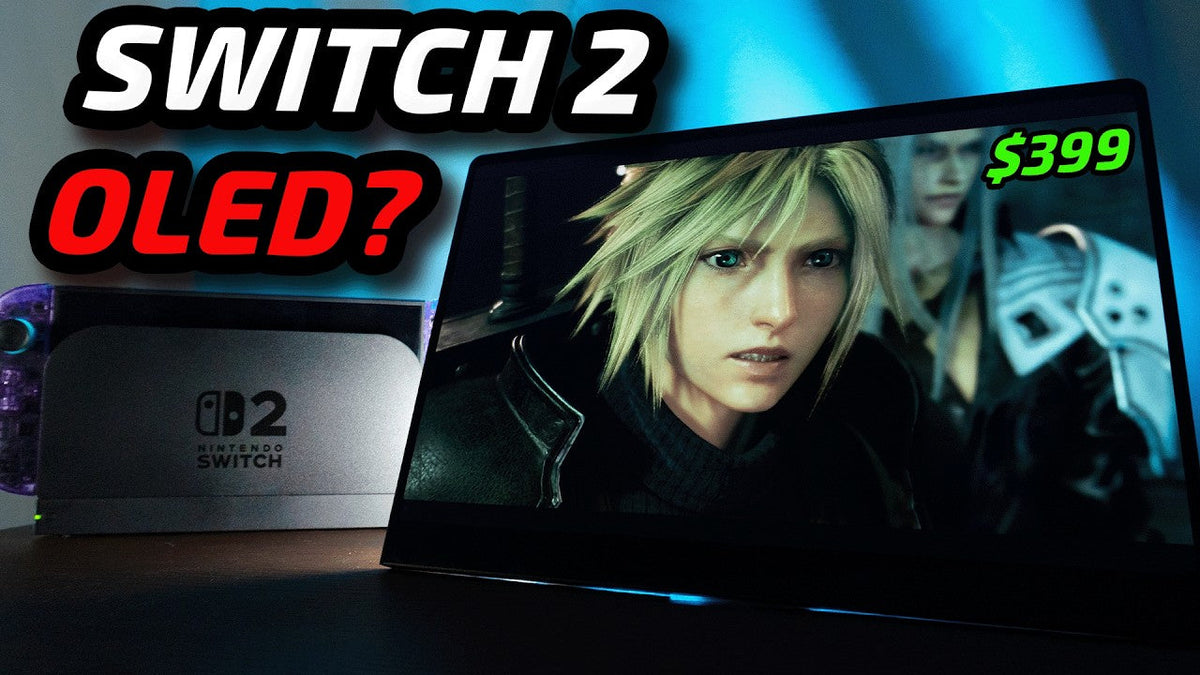
The Switch 2 has a good screen, but it still isn't OLED. So, when UPERFECT sent me this GR14BU 14-inch OLED monitor to test, I had one obvious question. Does putting the Switch 2 on OLED actually make the experience better, or does it just give you a prettier screen and a much uglier cable situation? And my first answer was, honestly, not really.
The Washed-Out First Impression

The first time I powered on this portable OLED monitor, the image looked pale, washed out, and nowhere near as impressive as I expected from an OLED screen. But then I changed. One setting and the entire screen transformed. The blacks became properly dark, the colors came alive, and Final Fantasy on the Switch to magnificent.
So in this video, I want to answer three things. Does OLED make a real difference? Is the setup actually practical? And is it worth paying almost 400 bucks for? Because the answer is not simply yes.
Disclosure & Testing

Disclosure
UPERFECT sent this monitor to me free of charge for testing. They did not pay me and they had no control over what I say. As always, everything you hear in this video is based on my own experience with it.
Video Structure
First, I will quickly show you what this monitor actually is and how the Switch 2 setup works. Then we will compare the Switch 2 LCD and the OLED in the same scenes. And finally, I will tell you whether I would genuinely keep using this after the review or whether this is one of those setups that looks amazing for 10 minutes and then lives inside a drawer because to be fair, we all have this one tech gadget that strictly doesn't get enough love.
The Monitor & Switch 2 Setup

What Is the UPERFECT GR14BU?
So, what exactly is this monitor? This is the UPERFECT GR14BU. It uses a 14-inch OLED panel with a resolution of 2880 by 1800, a 16 by 10 aspect ratio, and a maximum refresh rate of 120 Hz. Because this is a relatively small 14-inch screen with a 3K resolution, it has a pixel density of around 243 pixels per inch. Text icons, games, and fine details all look extremely sharp when you are sitting close to it.
Brightness & Touchscreen
UPERFECT also advertises up to 500 knits of brightness. For comparison, the Switch 2 screen is around 450 knits. On top of all that is also a touchscreen.
Build & Weight
It has an aluminum body and it weighs approximately 590 g, which is almost perfectly 1.3 pounds. Those are the important specifications. I'm not going to read the entire product page to you because, believe it or not, I also enjoy being alive. That is fun, yep.
Unboxing & Included Accessories

Packaging
This isn't the first UPERFECT monitor I've covered, so the packaging is familiar. It is nicely presented and everything is protected properly. Inside you get the monitor itself, the power adapter, Visa screws, and enough cables to connect it to most common devices.
Included Cables
There is an HDMI to mini-HDMI cable, a USBA to USB-C cable, a clearly marked USB-C power cable, and a full featured USB-C to USB-C cable that can carry power, data, and the display signal through one connection. My package. It also includes these useful right-angle adapters for mini-HDMI and USB-C.
Cable Management
They wrap the cables around the side and behind the monitor, which makes the setup look significantly cleaner, especially when the display is mounted. And no, it does not remove the cables, it just teaches them some manners.
Build Quality & Design

Premium Construction
The monitor itself looks and feels much more premium than a typical inexpensive portable display. That is mostly thanks to the aluminum body and its 7 millimeters thickness.
Thin OLED Panel
What stands out immediately is just how thin the OLED panel looks from the side. The integrated kick stand also feels surprisingly solid. It requires more force to move than its thin construction suggests, which is good because it prevents the screen from gradually falling backward.
Kickstand & VESA Mounting
When you close it far enough, it snaps back neatly against the monitor. It feels deliberate rather than loose. And yes, that little snap is weirdly satisfying. You can also use the included short screws to attach it to a 75 by 75 VESA stand. I actually like the monitor even more this way because the thin panel almost appears to float. Above the desk.
Controls & Ports

Physical Controls
On the left side are 5 physical buttons. You have power, menu, which also works as the confirmation button, and volume up and down, which become navigation controls inside the menu, and a back button.
Input Selection
That back button can also open the input selection, which is useful when multiple devices are connected. On the opposite side are 2 full-featured USB-C ports and 1 mini-HDMI input. And hey, the controls work.
Menu Navigation & Switch 2 Connection
Although navigating a monitor menu with 5 nearly identical buttons always makes me feel like I'm entering a cheat code. For the Switch 2, I connected the console through its dock, ran HDMI into the monitor's mini-HDMI and powered the screen separately.
The setup is simple, but it is not exactly Nintendo magic. You still need the dock, HDMI and power for the monitor.
First OLED Image Test

Initial Problem
So this is portable in the same way a laptop setup is portable, not in the same way the Switch itself is portable. But before we judge the practicality, we need to talk about the image because my first impression was actually not positive.
Washed-Out Image
When I first connected the monitor, everything looked unusually pale and washed out. I was worried that either my unit had a problem or that the OLD. Panel simply wasn't tuned very well. This was not exactly the dramatic OLED moment I had imagined, but after opening the monitor menu and enabling its HDR option, the difference was night and day.
HDR Transformation
Black suddenly looked properly black, contrast improved dramatically, and colors gained the depth I had been expecting from OLED. Look at this dark scene. On an OLED panel, individual pixels can switch themselves off instead of relying on a backlight behind the entire screen.
Why OLED Looks Different
That is why dark environments, bright effects against black background and nighttime scenes can. Look so convincing. I do wish this stronger looking profile had been the default because someone could connect the monitor, see that pale presentation, and assume the panel is disappointing. But once I had it configured correctly, my opinion changed very quickly. We had officially escaped the beige OLED phase.
OLED vs Switch 2, Practicality

Does OLED Actually Improve the Switch 2?
So first test, does OLED actually make the Switch to look better? Yes, but the size of the difference depends heavily on the game and the scene. For example, Final Fantasy already has beautiful environments, lighting and effects, but playing those scenes on OLED adds another level of depth. In nighttime sections, the dark portions of the screen almost disappear into the bezel while lights, fire spells, and interface elements remain bright and colorful.
Daytime Performance
During daytime sections, the difference is less dramatic, but the larger 14-inch panel still makes the experience feel more magnificent, and the high pixel density keeps the image looking extremely clean from this distance. Even here though, the OLED looks considerably more vivid than the Switch to.
Switch 2 Built-In Display Comparison
Built-in-screen, the colors have more depth and seem to pop from the display in a way the LCD simply cannot match. I also recorded the same locations so they switched to his own screen, but remember, a camera and YouTube compression cannot perfectly reproduce how either display looks in person, but I locked my camera exposure and white balance to make the compression as consistent as possible.
Contrast Difference
But as you can see, the biggest visible difference is the contrast and the way OLED handles darkness. There are two important things I need to make clear.
Resolution & Refresh Rate Clarification
First, this is a 3K monitor, but that doesn't mean the Switch too suddenly renders every game at native 3K. The monitor displays and scales the signal it receives from the console. Second, according to UPERFECT, the mini-HDMI connection is limited to 100 Hz. So yes, it looks better, and no, the monitor does not secretly install a more powerful GPU inside your switch. I checked.
Is the Setup Practical?

Portability Test
A portable monitor can look incredible and still be annoying enough that you stop using it after 3 days. So, is this actually a practical switch to set up at a desk, in a hotel, or anywhere you want a larger personal screen without using a television?
Where It Works Well
Yes. The monitor is thin, light, quick to position, and large enough to feel like a meaningful upgrade over the built-in display. The gig stand works well and the VESA option makes it even better as a permanent second screen, but it has no internal battery, that means the monitor.
Power Requirements & Best Use Cases
Always needs power from the adapter, a compatible device, or a sufficiently powerful power bank. And with the Switch 2, you also need the dock and HDMI connection. So, this is not something I would carry around just to play for 20 minutes on a train. But for traveling, a bedroom setup, a small desk, or playing somewhere without taking over the main television, it makes much more sense. It is portable, but it is not handheld, and that distinction is basically the entire practicality test.
PC Gaming, 120Hz & Touch

120Hz PC Test
To properly test the maximum refresh. Rate, I connected the monitor directly to my computer using one full-featured USB-C cable. That single cable provided the image signal and power, and Windows allowed me to select the native 2880 by 1800 resolution at 120 Hz.
Cyberpunk Test
Moving around the desktop immediately felt smoother, but Cyberpunk is where the combination become much more impressive. OLED already has extremely fast looking pixel transitions, and when you combine that with 120 refresh per second, camera movement animation. Much cleaner than on a conventional 60Hz portable monitor.
Touchscreen Setup
The display also supports 10 points touch, but my initial setup was not completely seamless. Touch did not work when I first connected the monitor. In my case, I had to add a dedicated USB data connection between the monitor and the computer before Windows recognized touch input.
Touchscreen Performance
Once connected, tapping, scrolling, dragging, and swiping all worked. However, the touch position on my unit appeared slightly offset. But after setting it up rightly in the Windows settings, it worked perfectly.
Do You Need Touch?
But hey, personally, touch is not a feature that would make me buy this monitor anyway. Glossy OLED screens collect fingerprints extremely quickly, and I would rather keep this panel clean and use a controller, mouse or keyboard.
Cleaning the Screen
So before finishing the test, I'm going to clean it properly with a soft microfiber cloth and a tiny amount of distilled water, never spraying the screen directly. The built-in speakers are easily one of the weakest parts of the experience.
Speakers & Overall Experience
They function and having speakers is better than having no audio at all, but I think present is a more accurate description than good. The sound is thin and lacks the impact that the picture quality deserves. For casual dialogues or a quick YouTube video, they are usable. For games, movies or music, I strongly recommend headphones or external. Speakers.
Strengths, Weaknesses & Price

Where We Stand
So, where are we now? Visually, the OLED absolutely improves the switch to experience, especially in dark and colorful games. It is excellent at a desk beside a bed in a hotel or anywhere you want a larger personal screen.
Practical Limitations
But the dark HDMI connection and need for power stop it from feeling like a true handheld upgrade. So now we arrive at the final question, is that improvement worth almost $400? After spending time with it, I think this monitor has three major strengths. First is the OLED panel. Dark games, colorful games, movies, and cinematic content look absolutely fantastic.
OLED Experience
I genuinely use my Switch 2 now more often. It is just fun to play on such a neat, compact, beautiful screen. Second is the combination of 3K resolution and a 14-inch size. The high pixel density makes the picture look exceptionally sharp without making. The monitor too large to carry.
Flexibility
Third is the flexibility. You can use the kick stand, attach it to a Vasa arm connect a console through HDMI or connect a compatible computer through one USB-C cable. The 16 by 10 ACE ratio is also useful beyond gaming. Compared with 16 by 9, it provides additional vertical workspace for browsing, editing timelines, documents, and general productivity. It is not perfect though. The default image on my unit looked washed out until I changed the display mode. The speakers are weak.
More Limitations
HDMI is limited to 100 Hz, so you need USB-C to access the monitor's full 1920 Hz mode. There is no free sync listed, and at the end, the glossy OLED surface looks beautiful but attracts fingerprints and reflections. None of those problems completely ruins the monitor, but at this price, they absolutely deserve to be mentioned. At the time of filming, New Perfect lists this monitor at around $400. That means this is not a cheap accessory you casually add to your Switch too. It is a premium portable display, and whether it makes sense. Depends on what you actually want from it.
Final Verdict

So is Nintendo Switch 2 on OLED actually better? Visually, yes. The contrast, black levels, larger image, and overall presentation create a noticeably more cinematic experience, but as a complete setup, it is only better in the right situation.
If you want something that remains as simple and portable as the Switch to itself, this does not replace the built-in display. It is not a real Switch to OLED. It is a very good external OLED setup for the Switch. And that is less dramatic and much more. Honest. The reason I kept using it after finishing my tests is simple. Games look fantastic on it.
Once the picture was configured properly, the combination of OLED contrast, 3K sharpness, and smooth 120 hertz PC output made this feel like more than a basic travel monitor. So, it is not perfect, but when image quality is the priority, this is easily one of the most enjoyable UPERFECT monitors I have tested so far.
Share:
UPERFECT GR16DQ 120Hz Gaming Monitor reviewed by VIDEOGAMES SCZ
UPERFECT GR16EQ 2K 144Hz Gaming Monitor reviewed by Axel