

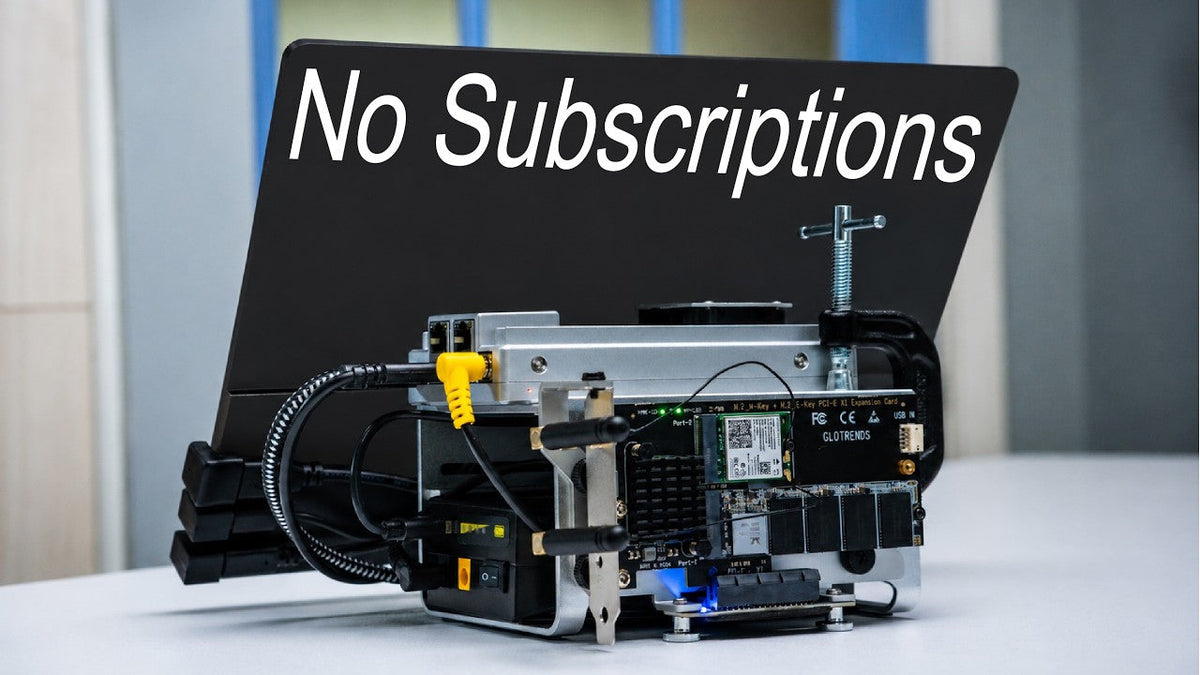
For the past week, I've spent time building this guy, a portable NAS that replaced my iCloud and Google Drive subscription. It's run entirely on a power bank and has its own UPERFECT GR14BU 3K OLED touchscreen, enabling it to do things beyond what a typical NAS can.
Why Do I Even Need a NAS?
Need a NAS

Well, the answer is pretty simple. I'm tired of paying monthly rent just to access my own data, and piracy is another big reason.
I don't want my personal. By being used to train AI models. Soy finger, there was no better time to build my own nest, and maybe you might want one too.
But of course, you don't need a jam set up like this. This little guy right here is the main character. This is the Zimabo 2 from Icew, a pocket-sized server.
The Zimaboard 2

There are two versions available on their website, 8GB and 16GB of RAM, with up to 64GB of built-in storage. Depending on your workload, you can choose the model that makes the Most sense for you. It does come with built-in storage, but it's mainly there for the operating system. For your actual file, you will need to add your own drive. And for most gate, you would want to use an HDD because it's gives you the most storage for your money.
But if you already have an SSD like I do, you can simply add a PCIE adapt the card and it's ready for installation.
Setting Up Zima OS

The Zimabo 2 come with Zima OS pre-installed, allowing you to configure everything. Directly from your browser. Once you're in, you can monitor your NAS status, manage, backup, and adjust all the settings. The App Store is where you will find almost everything you will need for your first home lab. There are more than 800 apps available, and they can only be installed with a single click.
Replacing Google Drive and iCloud

One of the first apps I installed was sync Things to replace my Google Drive setup. I simply create a shared folders and sync it between my MacBook Pro and this. Now whenever I drop the file onto one device, it will automatically appear on the other, making my workflow much more efficient. For my photo library, I'm using iMac to replace my iCloud photos. It automatically back up my iPhone camera roll whenever I take a new photo. And to keep iMac and syncing keep working even if I'm away from home, I'm using Tail scale as a private VPN. What this app does is it creates secure connection between my device, allowing me to accept and sync my 5 from anywhere.
Portable Setup
Making the NAS Portable

So, at this point, it was a fully functional NAS, but there was one thing that I did not like, it still needed an Ethernet cable and a power outlet, which was a bit much for my small desk. And since I'm a big fan of making things portable, I figured why not do the same here. So, I replaced the original M2 card with one that add Wi Fi support for power. I'm using a power bank with a fixed 12-volt barrel output tucked right under the cage. And now, I can basically put my server anywhere in the house and still stay connected.
Adding a Touchscreen

Now it looks a little bit more portable, but it's not 100% because I still need a second device in order to manage my nest. So, a wild idea crossed my mind. What if I gave it a screen, turn it into a true standalone device, just like a portable Mac Mini I built before.
So, I reached out to Uberfic and they sent me this 14-inch 3K OLED monitor. But what really makes it special isn't just how thin and beautiful it is, it is the touch support, making it a perfect match for this portable notch. But then a new problem came up.
How do I put these two together?
This monitor has a built-in stand and support visa mounting, but with all the cable sticking out the back, mounting it here didn't seem like a. Great idea.
At this point, I honestly almost gave up until I remember I had a desk stand from another Uber fake monitor and it has a Visa mount and fully rotatable. What I did is mount the monitor and slide it right into the gap and lock it down with a C clamp. After a little cable management, here it is, a complete portable Nest with its own touch screen.
Installing a Host OS

But here's a catch, ZimmelWest is managed entirely through a web browser. So, adding a touchscreen doesn't make it usable. I still need a host OS, some things like Windows or Linux. So, I install Linux on it, obviously, because for a project like this, it just makes a lot of sense.
Once everything was set up, I installed Casa OS which is very similar to Zima OS to manage the system and install on the app that I mentioned before.
Using It as a Computer

And because it is no longer just a NAS, it's basically a computer, so you can do a lot of. More thing with it. Some things like playing retro console games.
The processor obviously isn't powerful enough for AAA titles, but for emulators and retro games, it handled them surprisingly well. I tested a few games through the Dolphin emulators.
It's come with great upscaling options optimized for these classic titles, along with Foon's controller mapping support.
Battery Life and Temperature

Now, if you wonder about stability and battery life, this power bank has a capacity of 122. Watt hours. It can handle 3.5 hours of 4K video streaming or about 3 hours of gaming while powering both the monitor and the board. The temperature will depend on the workload. Under heavy use like gaming, I'm seeing around 40 to 45 °C. When idle, it stays around 30 to 35 degrees.
A Detachable Setup

Another thing I really like about this setup is it's completely detachable. You can pop the screen off NT and it's become a Portable external monitor for your laptop. Snap it back on and it is a NAS again.
Things to Keep in Mind
Now, before you get too excited about this project, which I hope you are, there's a few things to keep in mind.
The first thing is, keep your data safe because a NAS still just one device and if the drive falls, the NAS gets damaged or something unexpected happens, you could still lose everything.
Another thing to keep in mind that the initial cost can be quite high, but if you are willing to invest and you like to build things, you're definitely on a better path toward owning your data without relying on a subscription service.
Final Thoughts

For me, the biggest reason is simple. Projects like this let me build Thing, which I love to do and I can customize everything exactly the way I want, and it might not be the most practical solution, but as long as I'm still love building Thing and it's still done the good job for me. It is something that I can be proud of.
Share:
UPERFECT BE22BQ 22 Inch Portable Monitor Reviewed by AyLabs
UPERFECT GR16HQ OLED Portable Gaming Monitor reviewed by RePlayGaming