

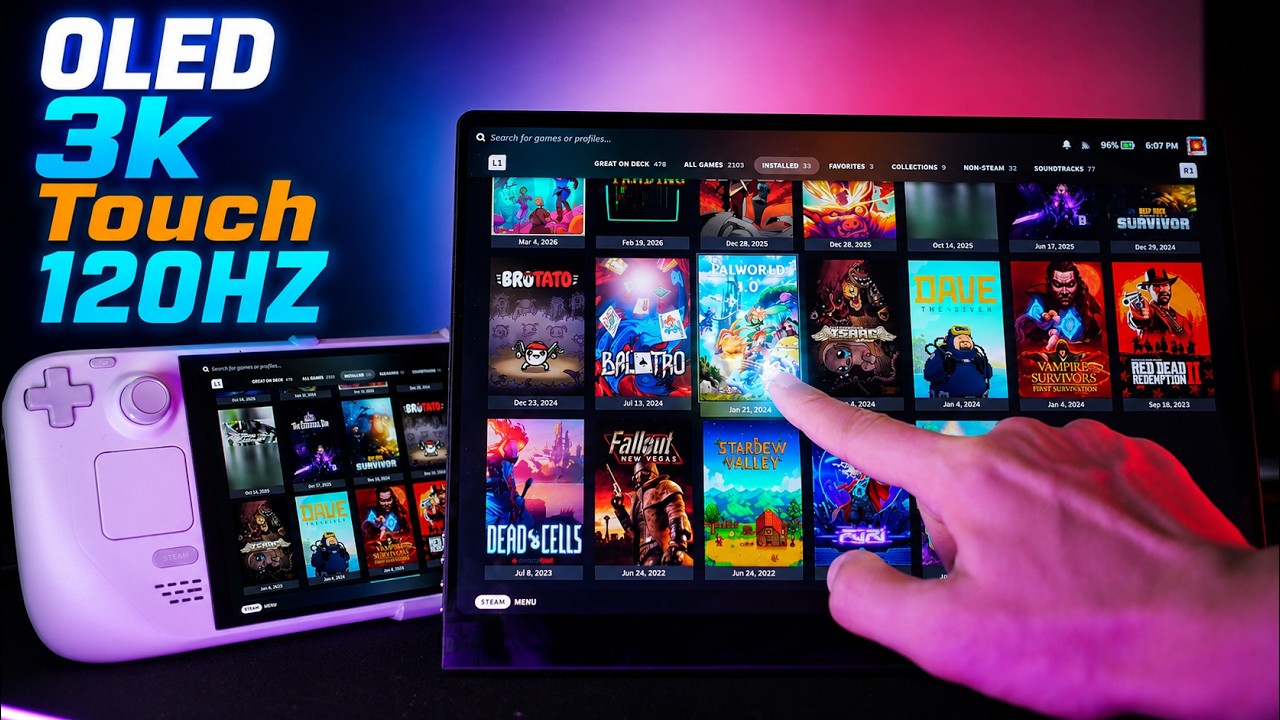
UPERFECT has a new portable OLED monitor, and this one finally has the feature I've been waiting for. This is the UPERFECT GR14BU 14 inches, 3K OLED, 120 Hz refresh rate, and a 10-point touch screen, and that touchscreen is the part I care about most because I've been testing your perfect monitors with the Steam Deck, and touch input in Steam OS is the one thing that was always missing.
Quick disclosure before anything else, UPERFECT send me this monitor for free. The is not sponsored. They're not paying me, and they haven't seen this ahead of time, and all opinions are my own. With that out of the way, let's get into it.
Specifications & Design

Display Specifications
That 3K resolution on a 14-inch panel puts you at 242 pixels per inch, which is sharper than a 27-inch 4K monitor. It's a 16 by 10 aspect ratio, 500 m of brightness. It's very light and it's 7 millimeters thick. It has a very premium feeling, aluminum frame, all glass front. It has a kick. Stand and Vs amount as well.
Price
It costs $629 but it's currently going for $399 and I have discount codes for you, which I'll get to you at the end.
What's in the Box
What you get in the box is the monitor itself, two USB-C to USB-C cables that carry power, video and audio, one USB-A to USB-C cable, and a mini HDMI two full-size HDMI cables. There is also a The power brick, the manual, and an M4 x 4 millimeter screws for the vast amount.
First Impressions & Build Quality

Exterior Design
First impression pulling it out is that it's slim and it barely weighs anything. The glass runs edge to edge on the front and it honestly looks very premium and very nice. It has a big chin at the bottom, but it doesn't really bother me that much.
Ports & Controls
On one side you have all the buttons required to navigate the menu, and on the other side you have two USB-C ports and the mini HDMI port.
Speakers & Rear Design
The speakers on this monitor are located on the bottom and on the back. We have the kick stand and two vessel mount calls.
Display Quality

OLED Panel Performance
The panel is OLED, as I said, and it looks stunning. True blacks, near infinite contrast, and colors that just have depth to them in a way no portable IPS panel gets close to. It's honestly pretty amazing. I thought I'd become pretty used to the OLED panel on the Steam deck, but this one looks even better. It's super sharp, very vivid, and I'm really loving it.
Glossy Finish
Now the monitor has a glossy finish, and I want to talk about that because I think it's the right call here. Usually when people hear glossy, they're kind of taken aback. The last UPERFECT monitor I tested had a matte coating, and Matt, as you know, kind of does the covers. This one has the glass front with the glossy coating, and I think it's exactly what I want and what the monitor needs. The covers just pop and they look amazing. Now if you shine a light source directly at it, you'll see a reflection, and that's just how glossy monitors work. But for gaming at home or anywhere with slightly controlled lighting, I think it's perfect. Brightness is at 500 mets, which I think is more than enough indoors.
Steam Deck Experience

Connectivity & Performance
Now for using this with the Steam deck, this is the part I actually wanted to test the most and probably the part you guys care about the most. Of a USB-C direct cable without any dock, the Steam deck outputs the full 3K at 120 hertz. Nothing weird when connecting to it. The image is displayed without any issues. It's worth knowing that the full resolution at 120 Hz only works over USB-C. Over you're capped at 100 Hz, and you. Drop down to 1,600p to get that 120 Hz over HDMI if you want to do that. HDR also works on Steam OS without any issues, which is a nice surprise.
Gaming Performance
For actual gaming, I mostly run at the Steam Deck's native 800P resolution because 3K is a lot to ask of the Steam deck, but for lighter titles, you can absolutely push the native 3K resolution, and it looks razor sharp. You notice that pixel density index in UI even more than in games.
LCD vs OLED Steam Deck
I tested this with both the LCD and the. Steam deck, and I think it makes more sense with the LCD Steam deck. If you're on the OLED, you already have a great panel in your hands. If you're on the LCD plugging this in is a real jump in image quality, and it's a very nice upgrade overall.
Multi-Touch Performance
And then there's the touch screen. On my previous UPERFECT monitor, I kept catching myself reaching up to tap the screen to change something in Steam OS and then remembering it wasn't a touch panel. This one is a 10-point multi-touch, no drivers required or anything weird, no setup. Required, it just works. It's a really nice touch, pun intended, and it's very responsive to you. I had no issues even typing on the Timers keyboard or just using it in general. I think if you end up using this, for example, for work more than gaming, you will have no issues using the touchscreen.
Power Requirements

Power Consumption
Now one big caveat to all these nice features is the power draw. The monitor has no internal battery and it pulls a fair amount of power. I measured between 30 and 60 watts depending on brightness and resolution. So you will need to. of external power rather than off the steam deck alone.
Portable Usage
Now UPERFECT includes a power brick in the box for exactly this scenario, and I was also able to run it off a 60 watt power bank with no problems, which is probably the setup I would take on the road. I think this is the only drawback for this monitor. I love using it with the steam deck, but unfortunately you need to account for that power, and the mobile setup becomes a bit more complicated with having to bring a power bank or use a power outlet. It's an inconvenience for sure, but it's personally one that I can. Live with because of how great the panel is.
Compatibility Testing

AYN Odin 3 Pro
I also tested this with my Audin 3 Pro, and on the AOYN Audin 3 Pro winning Armada OS, I had no issues at all. No scaling problems, no connection issues. And you get the same output resolution selection you get on Steam OS, so you can set it once and forget it, or you can change between the different modes. Touchscreen also works out of the box with no issues both. In gaming and desktop mode.
Android Compatibility
I also tried it on Android again, on the ON 3, and I had no issues. It picks it right up and touchscreen works without any problems. However, you can't really adjust the resolution on Android.
Desktop PC Compatibility
And on my desktop, it's great. Again, without any issues, I run it over the included mini HDMI cable and powered it with a USB 8 USB-C cable straight from my PC, and that was all it needed. The two USB-C ports and the mini HDMI port on the right side means you've got a lot of flexibility in how you. This up to whatever's on your desk or in your setup.
Button Layout
One nice addition for this monitor is that the buttons have a diagram on the back, so if you forget what each does, you can always refer to that, and I think that makes quick adjustments actually quick.
Kickstand & Audio

Kickstand Design
Now for the kick stand, and I think this is a real improvement. On my other UPERFECT monitor, I got a folding magnetic cover that doubles as a stand. It's really not bad. It does a good job at protecting it and acting as a stand, but this one is a small, dedicated piece, and it's much. Slicker, and I'll be honest, I really love it. Actually, it's stiff. It's actually kind of hard to open and close. That stiffness means it holds the panel exactly where you set it, and it does not wobble when you tap the screen, which on a touchscreen monitor matters a lot more than you'd actually think.
Speaker Performance
It also leaves the bottom edge of the monitor off the desk, which helps the two speakers. They are 21 watt drivers firing downward, and because they're not sitting flat against the surface, the sound bounces nice instead of getting muffled. Now, they're nothing special, but they're not bad either. Listen to this. your life.
Pricing & Discounts
Current Pricing
Now let's talk price and who this monitor is for. The UPERFECT GR14BU is listed as $629 but it's currently going for $399.
Discount Codes
And I do have codes for you. You can use code Steam50, and that takes $50 off any orders above $300 and Steam60, and that will take $60 off on any order above $400. Both are in the description as well as my link. If you decide to purchase the monitor using those, you'll be directly supporting the channel. So thank you for that.
Who Is This Monitor For?

Steam Deck LCD Users
So, who is this for? If you're on an LCD Steam deck and you want a display for travel or for the desk, I think that's a real step up from the built-in panel, and this is a really strong pick for a portable monitor.
Steam Deck OLED Users
If you're on the OLED, the jump is smaller, but the size, the resolution, the refresh rate, and that touch input still buy you a real upgrade.
PC Users
And if you're a PC user who wants a second screen that matches an OLED main display, this will do that job very well.
Final Thoughts

For me, It being OLED and having touchscreen is the standout features, and I love it for that. It fixes the exact problems I kept having with other monitors. So that's going to be for my take on the UPERFECT GR14BU.
Share:
UPERFECT GR185BF 18.5 Inch NxtLED™ Gaming Monitor reviewed by Pete Talks Tech
UPERFECT GR14BU Portable Monitor Touchscreen reviewed by Hubwood