

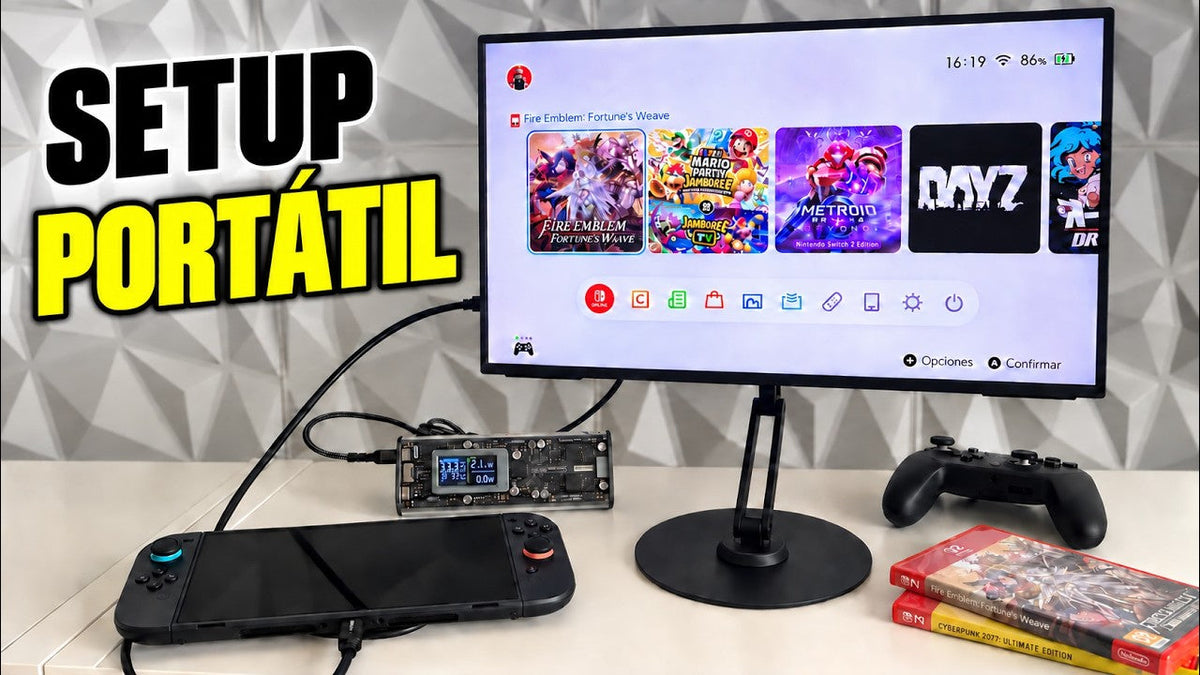
There are many types of switch to accessories, cases, controllers, chargers, but there are even monitors, and that's what we're going to see in this video. And yes, the Switch 2 screen seems decent if we don't compare it to the OLED, but playing on this monitor has been impressive. We'll test it thoroughly with games and then we'll try to pack all this into a backpack to see if we can build a portable setup you can take anywhere. Sound good? Let's get down to business.
1. Product Disclosure and Model Information

First, the disclaimer. UPERFECT sent me this monitor for the video, but there is no payment or sponsorship involved. The verdict on everything will be entirely my own, and everything you see here is what they send me. If you're gonna buy it, always check the contents of the package you choose, because some accessories might be sold separately. The model is called UPERFECT GR19BU, which, as is usual for monitors, sounds like a router password, and the product sheet indicates it's focus mainly on the switch to a fee, a switch 2.
2. Design, Stand, and Connectivity
2.1 Monitor Size and Stand Options

The first thing I want to show you is this, the console here and the monitor behind it. The size difference is more than evident, and we can set it up in two ways. The monitor has its own folding stand, which is used to place it directly on a surface, or we can take out this magnetic mount and prepare something more like a desk. the interesting thing about the stand is being able to place the screen at a comfortable height because if you're gonna spend an afternoon playing like this, your neck might have something to say, your neck might have something to say.
2.2 Cables, Power Requirements, and Direct Connection

Now for the cables, we have USB-C and mini HDMI on the monitor. And watch out for that Min causes the connector is obviously smaller than a standard HDMI. But it comes with the necessary cables and adapters to be able to use it. And before plugging in the console, one detail to keep in mind, this monitor needs external power that doesn't have its own battery. You can take it with you, of course, but you also have to think about where the power will come from, though luckily it does include a power port. Of course, this doesn't mean it won't work with a power bank, and we'll test that later on. For the first connection, I connect the switch to directly via USB-C and here is the image without Nintendo's dock in the middle, EEL. This is especially interesting if you wanna carry less stuff around. We saved the base, but we still need power, huh.
2.3 Using the Nintendo Switch 2 Dock

I recommend using it with the dock for long sessions, mainly because of the ventilation. The direct connection has the advantage of saving you the dock, but it will also make the console run hotter. With the dock, it looks like this. The base has its own power. The HDMI goes from it to the monitor's mini HDMI, and the screen gets power directly from the dock, and boom. It's a bit bulkier, but at least you can do it.
3. Gaming Performance and Display Quality
3.1 Cyberpunk 2077 and 4K Resolution

And now let's go with Cyberpunk 2077. Look at how this looks on this screen. I think the Switch 2 screen is fine for handheld gaming, but what impressed me is seeing games at this size and resolution. With Cyberpunk, we can see a lot of extra detail. Keep in mind that the panel is 4K, 19 inches, and also goes up to 144 Hz, and a, But in the case of the Switch 2, it's more a console limitation than a monitor one because you either get 4K60 or 1440 at 120 Hz for games that allow it. Of course, if you connect it to other more powerful devices, you won't have any problems there.
3.2 Understanding QLED and OLED Technology

Let's also clarify the letters on the box because this monitor is CLED and that is quite different from OLED. In a QED like this, you have an LCD screen with LED backlighting and a layer of quantum dots that helps reproduce color, color. In an OLED, the pixels emit their own light and can turn off individually to show pure black, that is why QED does not mean it is equivalent to the blacks of an OLED. They are completely different technologies. This doesn't mean this monitor didn't impress me with how games look, but keep in mind the difference between the Q and the O when choosing a monitor of this type.
3.3 Metroid Prime 4 and High Refresh Rates
Now we switch from Cyberpunk to Metroid Prime 4, and you probably already know why. Here we are gonna set it to 1440 and 120 frames to see how it performs, to see how it performs. So I leave you with the comparison on the console and on the monitor, recorded separately, and recorded separately. It is more than evident what a larger screen brings to the table in this case.
3.4 Orbital and Split-Screen Gaming

Now we are going to test orbitals, which interests me for a very specific reason. It is a cooperative game for two people, and we can play split screen on the same console, nah. So with this we can see another possible use for a monitor like this one. You place it on the table, you both sit down, and each of you has your own part of the screen. And look how different it looks. This would be practically impossible to play in switch handheld mode. Yeah.
4. Audio, Controls, and Portability
4.1 Built-In Speakers and Monitor Controls

Let's move on to another part that is usually overlooked a bit, and it has to do with the built-in speakers. For this, we're going to use DaiZ Cool Edition, a game where sound is quite important for survival. For volume and brightness, you have the controls directly on the monitor itself, and if you prefer headphones, you have that option too.
4.2 Monitor Weight and Carrying Accessories

Now let's talk about portability. The monitor weighs this much, all by itself. To this you have to add the console, the case, the cables, the power supply, and any accessories you want to take with you. The magnetic mount makes sense to leave it set up because the built-in stand is already more than enough in most cases, The cover serves to protect the screen, but for that, the backpack they sent me is more than enough.
4.3 Packing the Portable Gaming Setup

So, let's start putting inside what's necessary to assemble this setup. The monitor has its own compartment where it fits very well. We put in the stand, we put in the power bank, and to find a fault, the truth is that it weighs quite a bit. In this case, it's at least 4 kg, so let's just say you need a strong bag to carry all of this.
4.4 Power Bank Performance and Battery Life

As we said at the beginning, all of this can be powered perfectly with a power bank to feed the monitor and even the switch, but keep in mind that I'm using a 24,000 mL per hour one from charge, and it gives me at most about a couple of hours of battery life. And here's the difference that I find important for playing a bit. While you're killing time, while you're killing, the Swish on its own is more than enough. This monitor makes more sense when you go to a place where you're gonna stay for at least a couple of days and preferably where you have a table and a power outlet nearby and be same to you.
5. Versatility and Pricing
5.1 Using the Monitor Beyond Gaming

I really like the idea of having a small setup that you can pack away when you're finished. And as we mentioned at the start, the inputs allow you to use it with other compatible sources, for example, as an additional screen for a laptop as an additional laptop. If you're also gonna use it for work or with a PC, you have more opportunities to get your money's worth.
5.2 Price and Purchase Considerations
But now let's go to a very important detail, and that's the price. In the official store, you can get it for about $480 and you have to look at the version, the accessories, and the final cost depending on the country where you buy it, I've also seen it on Amazon, AliExpress, and other stores, but we're talking about it costing almost the same as the console, and that is a purchase that you have to think about very carefully, especially if you want it exclusively for the Switch.
6. Final Verdict

So, my verdict on how this monitor looks is what you've had since the beginning of the video, and I found it impressive. The console screen is fine, but I've really enjoyed sitting down to play on this 4K monitor and being able to choose between direct connection and the dock adds quite a lot of flexibility. Now, where I might have more complaints is the price, because the purchase really depends on how you use it.
If you have a screen you like exactly where you always play, then honestly, this doesn't solve any problems for you, the, but if you regularly move between different places, share the TV or want to set up and pack away your gaming area, then this is a very interesting proposition what I would weigh before making the purchase is how many times I'm actually going to enjoy the screen away from my usual spot. And that is the main difference between a gadget you actually use and one, you'll just keep stored in its case.
Share:
3 Ways to Turn a Mac Mini Into a Computer: UPERFECT GR16HQ Portable Monitor, XR Glasses & iPad
UPERFECT GR19BU QLED Computer Display for Switch 2 Reviewed by Sailing Phoebe Jo